
Use Comment-to-DM to Grow an Instagram Broadcast Channel
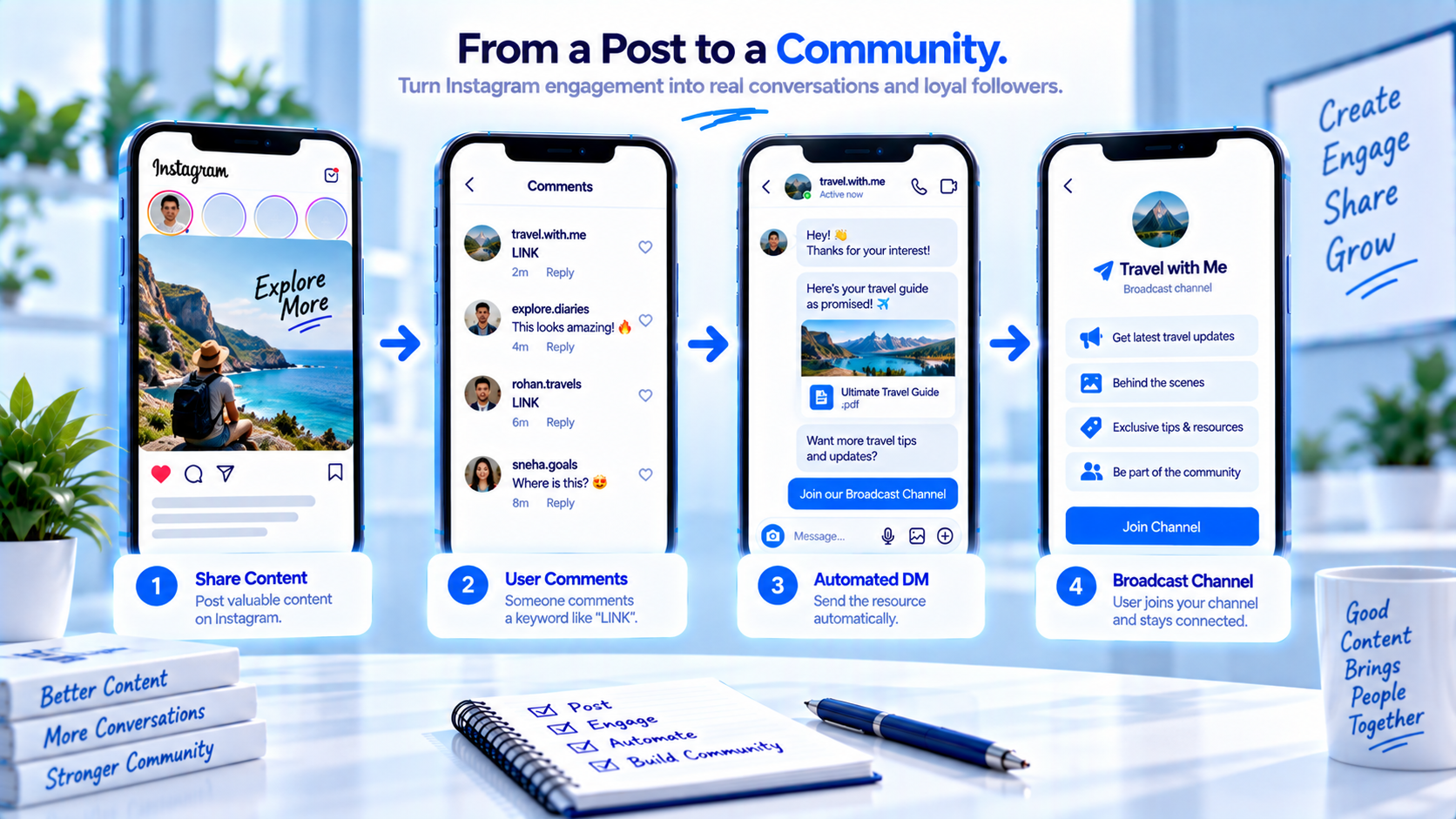
People who already commented are warmer than a cold “join our channel” sticker. The honest move is: send what they asked for, then invite. The dishonest move is: skip the file and enrol them in a feed of drops they did not request. CommentLink can put join instructions in the private reply. No respectable tool should silently add them to an Instagram Broadcast Channel. Instagram’s join is a tap they perform in Instagram’s UI. Your automation is only allowed to explain that tap.
Read this as a growth tactic on top of Broadcast Channel vs DM automation. You still need a channel that is worth joining — drop times, rain checks, a weekly note that is not the PDF. You still need comment-to-DM to deliver the first asset. The comment is not automatic enrolment. If the channel is empty or you do not have Create, delete the invite line until the channel is real.
A comment is a request, not a channel join
They commented GUIDE because you taught GUIDE. That comment licensed a private reply with the guide. It did not license a subscription. Instagram’s channel join is a tap they perform in Instagram’s UI.
If the DM is only a join pitch, you baited them. If the DM is the guide plus one line about weekly notes in the channel, you offered a second door. Keep the doors in that order.
How invite-after-value actually runs
- Reel or carousel teaches a keyword tied to a real file (LOOKBOOK, SETLIST, MENU).
- They comment that word.
- Private reply sends the file or URL first.
- Second sentence: how to join the channel and what they will get there that is not in the file.
- They tap Join in Instagram if they want it. You do not API-subscribe them.
- Later channel posts are updates, not a replacement for the next comment-to-DM asset.
Sample comments and the invite that follows the asset
Record shop Reel of a new pressing. Caption: “Comment TRACKLIST.” Comment: TRACKLIST. DM: “Tracklist + preorder: [URL]. If you want drop times without hunting Stories, join the Broadcast Channel from our profile — it’s optional.”
Campus comedy night. Caption: “Comment LINEUP.” DM: “Doors 7, lineup: [URL]. Rain checks and late seat notes live in the channel. Join from the profile if you want those; the lineup link above is yours either way.”
Do not: “You’re in! Here’s the channel.” They are not in until they join. Channel versus Story persistence is a different article: channel vs Story for updates.
Setting comment-to-DM to grow a channel
- Create the channel in Instagram. Confirm you can see Join on a test account.
- Write what the channel is for in one sentence (drop times, not the PDF).
- Build the comment keyword with the PDF or URL as the first line of the DM.
- Add one optional join line with where to tap (profile / channel name).
- Test as a non-follower: asset arrives, join is optional, no “already subscribed” lie.
- Keep JOIN as a separate keyword only if that commenter asked to join, not as a substitute for LOOKBOOK.
Invite mistakes that feel like bait
- Hiding the payload behind Join. Instead: file first, invite second.
- Claiming AutoDM added them. Instead: they tap Join.
- Daily join nag on every keyword. Instead: invite on the weekly drop Reel, not on every PRICE comment.
- Channel-only coupons while the comment said LINK. Instead: the coupon they commented for goes in the DM.
- The same manifesto in the public reply and the DM. Instead: public one-liner; DM carries the file.
- Using a scraped “add to channel” vendor. Instead: official Instagram join only.
Growth habits that stay honest
- Say what the channel contains that the PDF does not.
- Invite after value on launch content, not on support keywords.
- Staff channel questions if Instagram shows replies; that is not CommentLink.
- Do not double-send the same drop in a DM blast and a channel post as if they were one product.
Copyable channel-invite DM template
Line 1: “Here’s what you commented for: [URL]. Check Requests if you don’t follow us.”
Line 2: “Optional: our Broadcast Channel is [one sentence]. Join from the profile — we won’t add you ourselves.”
Public reply: “Sent. Check DMs / Requests.”
If they reply “already joined,” send nothing else promotional. If they reply “how do I join,” send the tap path, not a new file dump.
What belongs in the channel versus the private reply
The private reply holds the unique asset for this comment: tracklist, lineup, lookbook, menu PDF. The channel holds repeating operational news: “doors moved to 7:15,” “the pressing slipped a week,” “Saturday brunch is 11–3 until monsoon ends.” If you put the unique asset only in the channel, commenters who never join never get what they asked for. If you put every operational update only in DMs, you will hit caps and annoy people who wanted one file.
Write a one-line inventory. Channel this week: three updates max. DM this week: whatever keyword you taught. If an update is a one-time file (the PDF), it is a keyword. If it expires and you will say it again to joiners, it is a channel post in Instagram’s composer.
Stories still exist for 24-hour reach. Persistence versus Stories is a different comparison — channel vs Story for updates. Do not collapse all three into one caption.
How to talk about joins without fake counts
You will not get a CommentLink dashboard of channel subscribers. Instagram owns that list. Do not screenshot a fake counter. Measure what you can: comments on the keyword, DMs sent, and (manually) whether test accounts can see Join. If you need join counts, look in Instagram’s channel insights when they exist — and recheck Instagram Help, because that UI moves.
Never write “5,000 people already joined” in the DM unless you can see that number in Instagram the same morning. Inflated social proof is how invites start to feel like bait even when the file was real.
When to stop pitching the join link
Support, refunds, and “you charged twice” never get a channel pitch. People who said they already joined do not need the paragraph again. If the channel is paused or Instagram hid Create, delete the invite line from the DM until it is real.
A human should take anyone who says the join button is missing or they joined and still cannot see updates — that is an Instagram account issue, not a keyword miss.
Apparel restock: chart in the DM, drop times in the channel
Comment SIZE. DM line 1: “Chart + this colourway: [URL]. Check Requests.” Line 2: “Optional: restock and drop times live in the Broadcast Channel — join from the profile. We will not add you. The chart above is yours either way.” They got what they commented for. The invite names a job the PDF cannot do.
If the only coupon for this colourway sits in a channel post, commenters who never join were baited. Put the coupon they commented for in the DM. Use the channel for “slipped a week,” not for the unique file.
A dedicated JOIN sticker versus invite-after-LOOKBOOK
A profile Reel that is actually about the channel can teach JOIN. DM: how to tap Join, what they will hear (hours, rain checks), and that this is not a lookbook. That is honest because the comment asked to join.
A lookbook Reel should teach LOOKBOOK, then one optional join line. Daily join nag on PRICE comments feels like bait. If Create is missing or the channel is empty, delete the invite sentence until the channel is real. CommentLink still sends the file. The invite is extra.
What comment-to-DM cannot do to a channel
- API-subscribe them. Instagram’s join is a tap they perform.
- Post the Thursday reading into the channel composer. That UI is Instagram’s.
- Show a CommentLink subscriber count. Instagram owns that list. No fake “5,000 joined” in the DM.
- Replace the next SIZE send with “you should have joined.” They still get the chart.
FAQ
Can AutoDM add someone to my Broadcast Channel?
No tool should silently enrol them. Send an invite they tap. CommentLink can send that invite text in the private reply.
Should the join line replace the file?
No. The comment paid for the file. The channel is optional.
Can I use JOIN as the only keyword?
Only if the post is actually about joining. If they came for a lookbook, teach LOOKBOOK.
Do I need a channel to use comment-to-DM?
No. Comment-to-DM works without a channel. The invite is extra.
What if they never join?
They still have the asset. That is a successful comment-to-DM.
Where do I compose channel updates?
In Instagram’s Broadcast Channel UI. CommentLink does not post there.
Can I teach JOIN on a lookbook Reel as the only word?
Only if the post is about joining. If they came for a chart, teach SIZE or LOOKBOOK and invite after the file.
What if Instagram hid Create this week?
Delete the invite line until Join is real on a test account. Keep sending the asset. Comment-to-DM does not need a channel.
Will CommentLink show how many people joined?
No. Look in Instagram’s channel insights when they exist. Do not invent a counter in the DM.
Related reading
Send the link in a private DM
Connect Instagram with Meta login and send a private DM when someone comments a keyword.
See comment-to-DM