
Instagram Automation for Content Creators
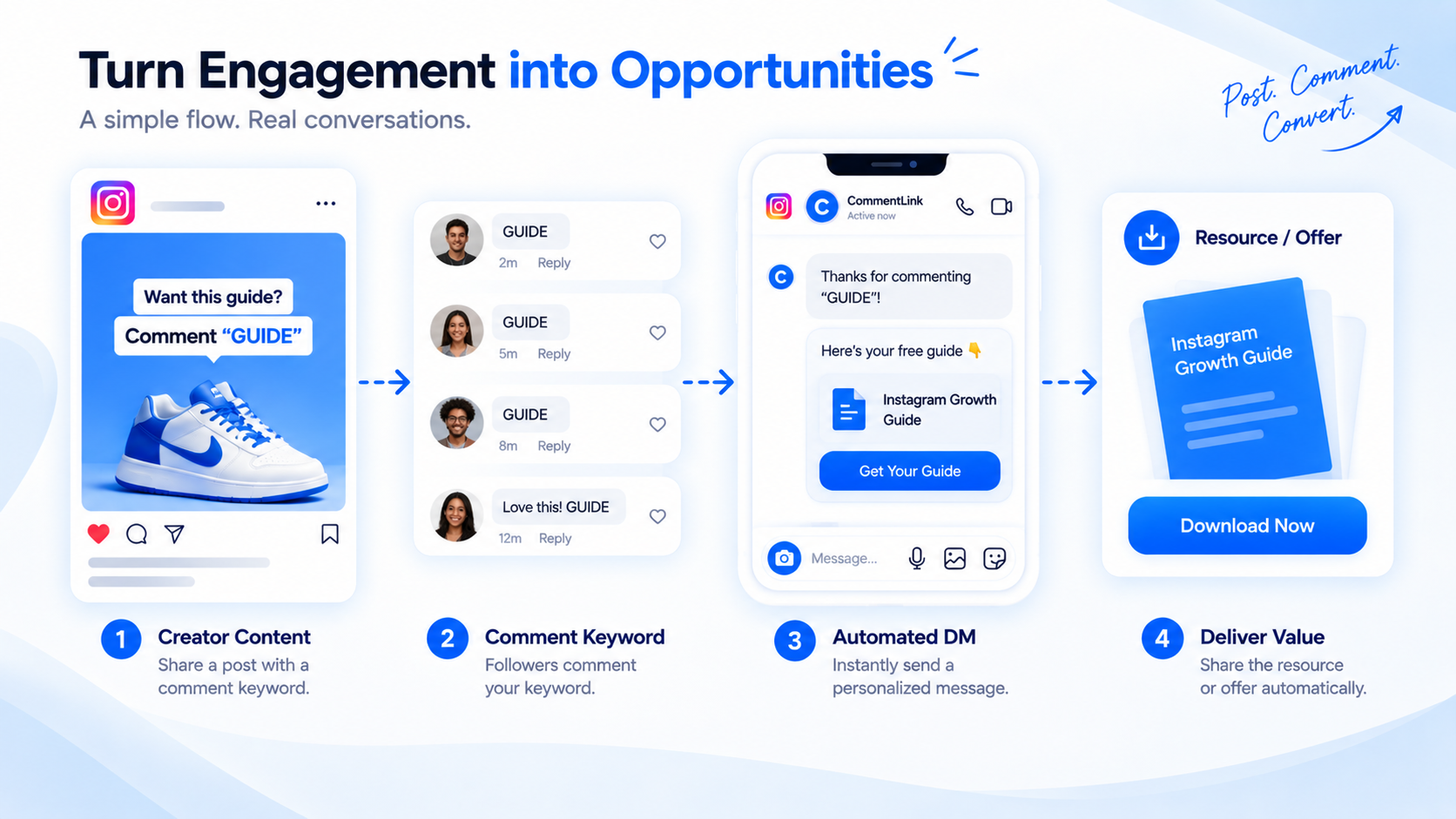
Instagram automation for creators is comment-to-DM, Story reply and mention DMs, optional email collect, and an inbox you actually open. It is not a second copy of deliver a lead magnet from a Reel — that piece owns the magnet play. This one owns the creator job-to-be-done: keep making the work while the repeat questions answer themselves.
Official Meta login. No Instagram password. Queue when a Reel spikes. WhatsApp in the same inbox if you connect it — comments still do not become WhatsApp. Creator hub: creators. What’s free: free Instagram DM automation. Story-shaped playbook: Story + DM playbook.
What to automate first
- The Reel that already gets “link?” comments.
- Story replies when you post a booking or merch slide.
- A GUIDE keyword if you will email the list.
Do not start with a twelve-node funnel. Teach one keyword on content you already publish, send the promised next step in a private DM, and staff Message Requests. Influencer-shaped positioning: Instagram automation for influencers. Digital products: automation for digital products.
Creator comments and DMs that stay useful
Independent musician in Goa. Caption: “Comment SETLIST for Friday’s order.” Comment: SETLIST. DM: “Friday order + door time: [URL]. Check Requests. This isn’t a ticket — book on the page.” Brand-deal threads stay human.
Illustrator posting a brush pack. Caption: “Comment BRUSHES.” DM: “Pack + licence note: [button]. Custom commission quotes: reply HUMAN.” Do not auto-send a rate that is six months stale.
Newsletter writer. Caption: “Comment WEEKLY.” DM: collect_email then the archive URL. If they type a pitch for a collab, that is handoff — not another subscribe loop.
What to keep human
Brand deals, upset fans, anything that needs a judgment call. A comment that says “your last video stole my audio” is not GUIDE. A DM that says “I already paid Razorpay, no file” is not a second automated pack. Handoff criteria: sales handoff criteria.
Collab posts and whose comment fires whose automation are messy. Test. Do not assume the guest’s LINK rule runs on your Reel. Live comments are not a CommentLink trigger — say the keyword lives on the VOD Reel.
A creator setup you can finish in one sitting
- Professional account. Meta login into CommentLink. No password APKs.
- Pick the Reel with existing “link?” comments. Teach one keyword.
- First DM: the asset + Requests note. Optional one-line public reply.
- Optional: Story reply keyword on a merch slide the same week — not five Stories.
- Optional: collect_email only if you will send a list you actually write.
- Test with a second account that does not follow you. Staff Requests the hours you are awake.
Mistakes that pull creators back into the inbox
- One LINK for merch, presets, and a coaching call. Instead: one URL per Reel.
- Promising Live AutoDM. Instead: we have no Live trigger. Point at the Reel.
- Silent comment-to-WhatsApp for “faster close.” Instead: they message WA; comments stay on IG.
- Follow-gating a free preset on a discover Reel by default. Instead: send the preset if that is the funnel; gate only if you accept fewer sends.
- Ignoring the queue on a viral clip. Instead: caption honesty + queue, not a duplicate rule.
- Letting AI reply invent a collab rate. Instead: scripted pack prices; humans for deals.
Copyable weekly creator rhythm
Monday: one keyword Reel live, DM payload checked.
When you post a Story merch slide: story_reply keyword MERCH, same destination as the Reel or a dated drop page.
Friday: 15 minutes in Requests. Handoff brand deals. Do not rebuild the keyword because a non-follower did not look in the folder.
Once a month: kill keywords on dead media so you do not surprise-DM an old comment inside Meta’s window.
What CommentLink cannot do for creators
No Live comment trigger, no Trial Reels mode, no Broadcast Channel posting from our canvas, no Click-to-Direct ads, no Shopify catalog messaging as a native feature, no Meta Business Agent. We do not staff your night shift. We do not guarantee Primary. We do not turn comments into WhatsApp sends.
Triggers you actually have: comment_keyword, reel_comment, story_reply, story_mention, dm_keyword, new_follower. Nodes: send_message, send_image, send_buttons, delay, condition, follow_gate, collect_email/phone, add_tag, ai_reply, human_handoff. That is the creator product. Everything else is a different vendor or Meta’s own UI.
Free, India, and adjacent hubs
If you only need the fee positioning for Indian creators, that is free automation for Indian creators plus the live free Instagram DM automation page. If you need the India operator landscape (IST, official APIs, Hinglish), that is Instagram DM automation in India. This article stays on the creator job: keyword, asset, inbox.
Personal brands and consultants have their own pieces. Do not stretch this hub into a B2B qualification essay. Keep making the work.
Story mentions, new followers, and the jobs that are not a Reel keyword
story_mention is not a licence to pitch a preset. If someone mentions you in a Story, a thank-you plus a human is often the whole job. If you built a mention automation that dumps CHECKOUT, you will look like a bot in their friends’ DMs. Keep mention replies short and optional.
new_follower can send a welcome with one link to the current free file — not the entire catalogue. A welcome that is a 12-button menu is how you train them to mute you on day one. If the follow came from a follow-gate on a Reel, they may already have the payload; do not send it twice as a “welcome sequence.” There is no second private reply on the original comment, and a new-follower DM is a different event. Do not stack both with the same novel.
Newsletter creators: WEEKLY keyword collects email then sends the archive. Do not also auto-add them to a WhatsApp list. Photographers: PRICE on a wedding Reel sends the published packages; custom destination quotes stay human. Digital product makers: PRESET sends the licence page; refunds for a failed download are handoff, not a second zip.
Time you actually get back
The creator job-to-be-done is hours, not a fake funnel. If you spent evenings pasting the same Gumroad link, comment-to-DM is that paste. You still answer collabs. You still check Requests after a spike. Count the paste time, not a made-up “funnel conversion.” Time-savings framing: time savings for creators.
When a clip goes to Trial Reels, we do not have a Trial mode. A comment rule may still fire if Meta sends the comment event — test that media. Do not promise Trial AutoDM. Collaboration posts: test whose account owns the comment before you tell a guest their LINK will fire your flow.
FAQ
How do content creators automate Instagram DMs?
Teach a keyword on the content you already publish, send the promised next step in a private DM, and staff Message Requests. Start with the Reel that already gets “link?” comments.
Should I automate brand deals?
No. Keep deals, complaints, and stolen-audio threads human. Automate the file people already ask for.
Can CommentLink DM people who comment on my Live?
No Live comment trigger. Put the same keyword on a Reel and say so on air.
Is WhatsApp included if they comment?
Only if they write on WhatsApp. The comment stays on Instagram. You can connect both in one workspace.
What’s free?
Read the live free Instagram DM automation page the day you connect. This article will not freeze a price. Meta still rate-limits.
Do I need a follow-gate on every creator Reel?
No. Use it when the follow is the product. If the Reel is the funnel for a file, send the file.
Should a new-follower welcome repeat the Reel payload?
Usually no. If they already got the file through the comment, a short hello is enough. Do not stack a second catalogue.
Related reading
CommentLink for creators
Turn comments, keywords, and Story replies into DMs so you keep creating while the conversation starts.
See creators