
Creators: Deliver a Lead Magnet from a Reel
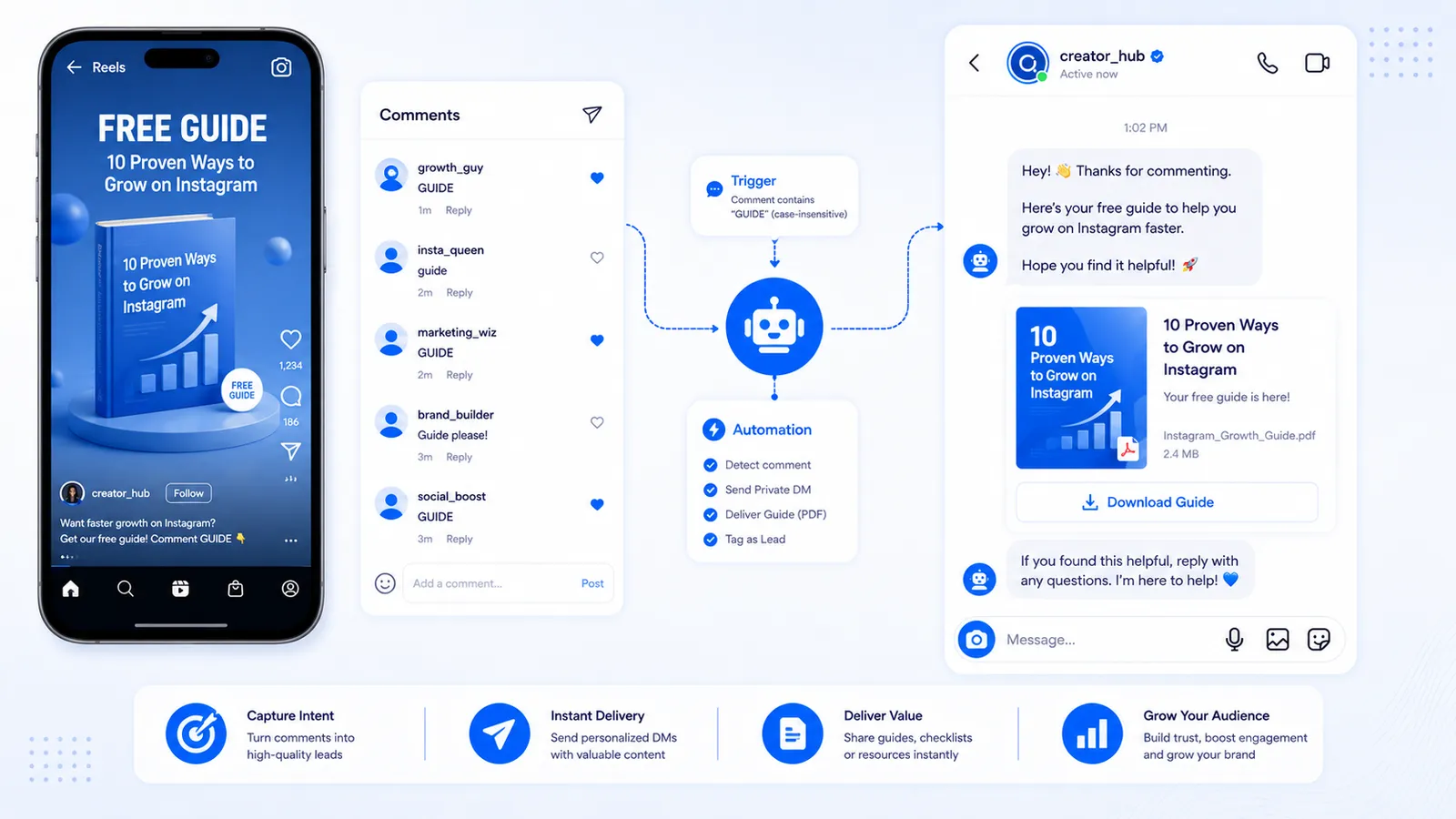
A Reel can create intent in 15 seconds and then dump the person on a bio that still lists last year’s freebie. The creator pattern that holds up is: on-screen word (GUIDE, LIST, YES) → comment → Instagram DM → optional email collect → file. You get a conversation on a channel you connected with Meta OAuth, and if you collected email, a list Instagram cannot take away when the Reel dies.
This is not a cold DM to viewers. Only commenters get the magnet. It is not comment→WhatsApp. Use comment-to-DM on the Reel, same engine as feed posts.
Name the file so a stranger wants it. Burn GUIDE on screen. Disclose email collect if you use COLLECT_EMAIL. Send the file after a valid address, or skip collect and send the URL. Welcome openers (up to four on free) are a different door for people who open the inbox without commenting. Collab Reels: test which account’s media the webhook sees. No fake download counts, no comment-to-WhatsApp, no scraping viewers into a newsletter. Professional account, Page, Meta login. When Explore hits, Requests and the hourly cap are the whole volume story — native drops, CommentLink queues. If you never email, do not collect; the extra step is for a list you will actually use. Agencies connect talent through Meta OAuth and recreate the keyword when the file changes. Keep the public reply to one line so Explore comments do not become a clone wall. If two Reels teach GUIDE, keep the same file unless you version the magnet in the caption. Native users can DM a Drive link and collect on the landing page instead of using a collect node inside Instagram DMs. That pattern is honest and still official API work.
Make the magnet worth a comment
A recycled 40-page PDF nobody asked for will get comments from people who want “free” and then ignore you. Name the outcome on screen: “Comment GUIDE for the 1-page packing list I actually use on set.” Specific beats “free ebook.”
Host the file on a URL you control, or send it as a DM attachment if your flow supports that media type. If you only have a Notion link, that is fine — put it in the DM, not in a public comment storm.
Reel setup
- Professional account, Facebook Page, Meta login.
- Burn GUIDE (or your word) on the Reel. Say it once in audio for people with sound.
- Attach comment-to-DM to that Reel, or arm upcoming if it is not posted. Applies-to: Reel.
- Match contains guide unless you have a strict code.
- DM 1: “It’s in this chat — if you don’t see it, open Requests.”
- Optional COLLECT_EMAIL: “Reply with the email that should get the PDF so you still have it if Instagram eats the thread.” Then send the file.
- Optional short public reply. Skip a follow-gate unless the Reel is a growth play and you said so on screen.
- Test from a second creator-adjacent account, not only your phone’s logged-in profile.
Collect details: treat the email as a real opt-in in the prompt. The comment was not the newsletter signup. Feature: lead capture.
Creators who should skip email collect
If the magnet is a 30-second checklist and you do not email, send the URL. Extra collect steps lose people who already did the comment. If you live on email launches, collect. Measure file opens versus emails captured — they will not match, and that is normal.
Welcome openers versus the Reel
People who DM you “hey” without commenting can hit welcome openers (up to four tappable options on CommentLink free). That is a different door: book a call, get the menu, talk to a human. Do not rely on openers to deliver the Reel magnet — those people did not comment GUIDE. Keep the Reel automation for commenters.
When the Reel hits Explore
New people, Message Requests, hourly cap. Native drops; CommentLink queues. A lead magnet that arrives six hours late is still useful; a public thread of identical 80-word replies is not. Keep public copy short.
If you also auto-reply on Reels for community (thanks, FAQ), do not run two conflicting keywords. One magnet word. Policy: is comment automation allowed.
One Reel versus a series
If you teach GUIDE on five Reels, use the same word and the same file unless you version the magnet. Changing the PDF behind GUIDE without saying so is how people call you a bait account.
A series can use GUIDE1 / GUIDE2 if you truly have two files. That is harder to teach on screen. Prefer one magnet and a welcome opener for “what next” once they are in the inbox.
Collabs and borrowed audiences
On a collab Reel, only the connected account’s automation runs. If the magnet is yours, connect your Professional account and test comments on the copy of the Reel your picker shows. The partner should not also fire a conflicting GUIDE DM unless you planned a dual delivery.
Do not scrape the partner’s commenters. Official APIs send to people who commented on media you are allowed to automate. That is the whole trick.
What not to promise
- “Comment and I’ll WhatsApp the file.” CommentLink will not do that from the comment.
- “Unlimited DMs, no Instagram cap.” False on every official tool.
- Fake download counts or “10,000 students.” Do not invent social proof.
- A password login tool that “scrapes commenters into Klaviyo.” That is the unsafe category.
A creator checklist from idea to list
Name the magnet in one line a stranger would want. If you cannot, do not spend a Reel on it. Host the file. Decide whether you need the email (launches) or just the DM URL (reputation). Professional account, Page, Meta OAuth.
Script the Reel around the outcome, then burn GUIDE (or your word) on a readable frame. Caption repeats the word and mentions Requests. Upcoming applies-to Reel if you are not live yet. Contains match. Public reply optional and short. Follow-gate off unless this is a growth Reel you advertised as follow-to-get.
If collecting email: disclose it on screen. COLLECT_EMAIL prompt states what you will send. File goes out after a valid reply. Do not scrape emails from public comments. Do not promise WhatsApp delivery.
Test. Then publish. When Explore hits, queue versus drop is the only volume story — not “unlimited.” Next week, send the email list only what you promised. Welcome openers can offer the next step (book, ask a question) to people who open the inbox without commenting. That is a second door, not a replacement for GUIDE.
Agencies: connect talent’s Professional account, never a password. Recreate GUIDE per Reel if the file changed. Collab Reels: test which media the webhook sees. One sender. No fake student counts in the caption.
FAQ
Can I use native Comment to Message for a lead magnet?
Yes: keyword, DM with a Google Drive or landing URL. Add a form on that page if you need email. CommentLink’s collect node keeps the ask inside Instagram DMs.
Should the magnet live in the bio instead?
Bio is a fallback. The Reel should not depend on them hunting a Linktree slot named “free thing 4.”
Do I need a follow-gate on a free PDF?
Only if follows are the campaign. For list-building, email collect usually matters more than a follow tap. Do not stack both without a test.
Can agencies run this for talent?
Yes, on the talent’s Professional account connected via Meta OAuth. Recreate the keyword per Reel. No password sharing.
PDF in the DM or a landing page?
Either. A landing page is easier to update and to put a form on (native-friendly). An attachment or Drive URL in the DM is faster for the viewer. If you collect email, send the file after the address so you are not leaking the magnet to throwaway comments. Do not change the file behind GUIDE without saying so on the next Reel.
How do welcome openers fit a lead magnet Reel?
Openers (up to four on free) greet people who open the inbox without commenting GUIDE. Offer book / ask / next lesson there. Do not rely on openers to deliver the Reel file — those people did not comment. Keep GUIDE on the comment engine. Both can be on. They are different doors.
What if Explore traffic never emails me?
They may not open Requests, or the collect step was a surprise. Disclose collect on screen. Shorten the prompt. Offer the file without email on a second Reel and compare captures. Some creators should skip collect. A list of zero is what you get when you hide the ask and the Requests folder. Fix the public hint before you add more flow nodes. Then test from a second account that has never messaged you, so you see Requests the way a stranger does on a phone they just installed.
Related reading
Send the guide in the DM when they comment
Comment-to-DM on the Reel, optional email collect, then the PDF or URL. Meta login only. No password bots.
Automate Your Instagram DMsRelated articles
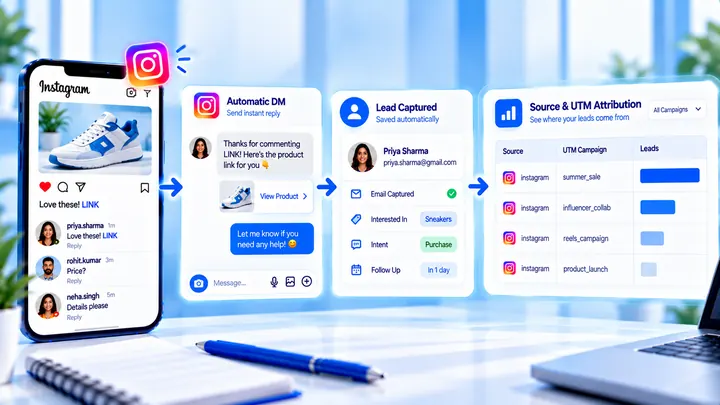
How to Measure Leads from Instagram Comments
A lead from a comment is a contact you can follow up — not a comment count. Wire keyword → DM → email or UTM before you celebrate.
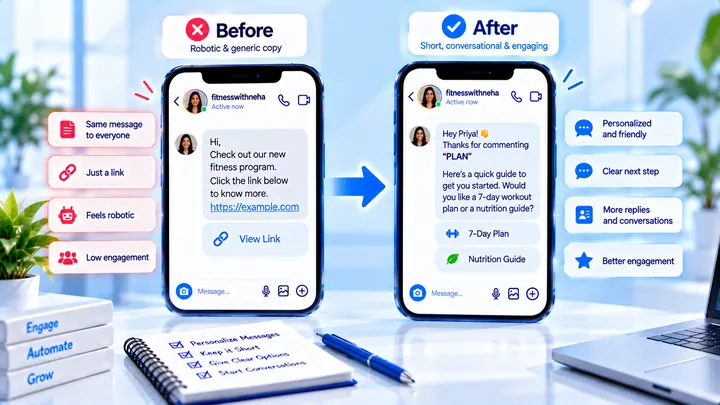
How to Write Automated Instagram DMs That Feel Human
Write human-sounding Instagram automated DMs: short openers, the promised next step, and a CTA that invites a reply — not a pitch wall.
How to Attribute Sales with Coupons in Instagram DMs
Unique codes in automated DMs can beat UTMs when checkout is messy — if you rotate codes and accept some leakage.