
Instagram DM Automation for Coaches
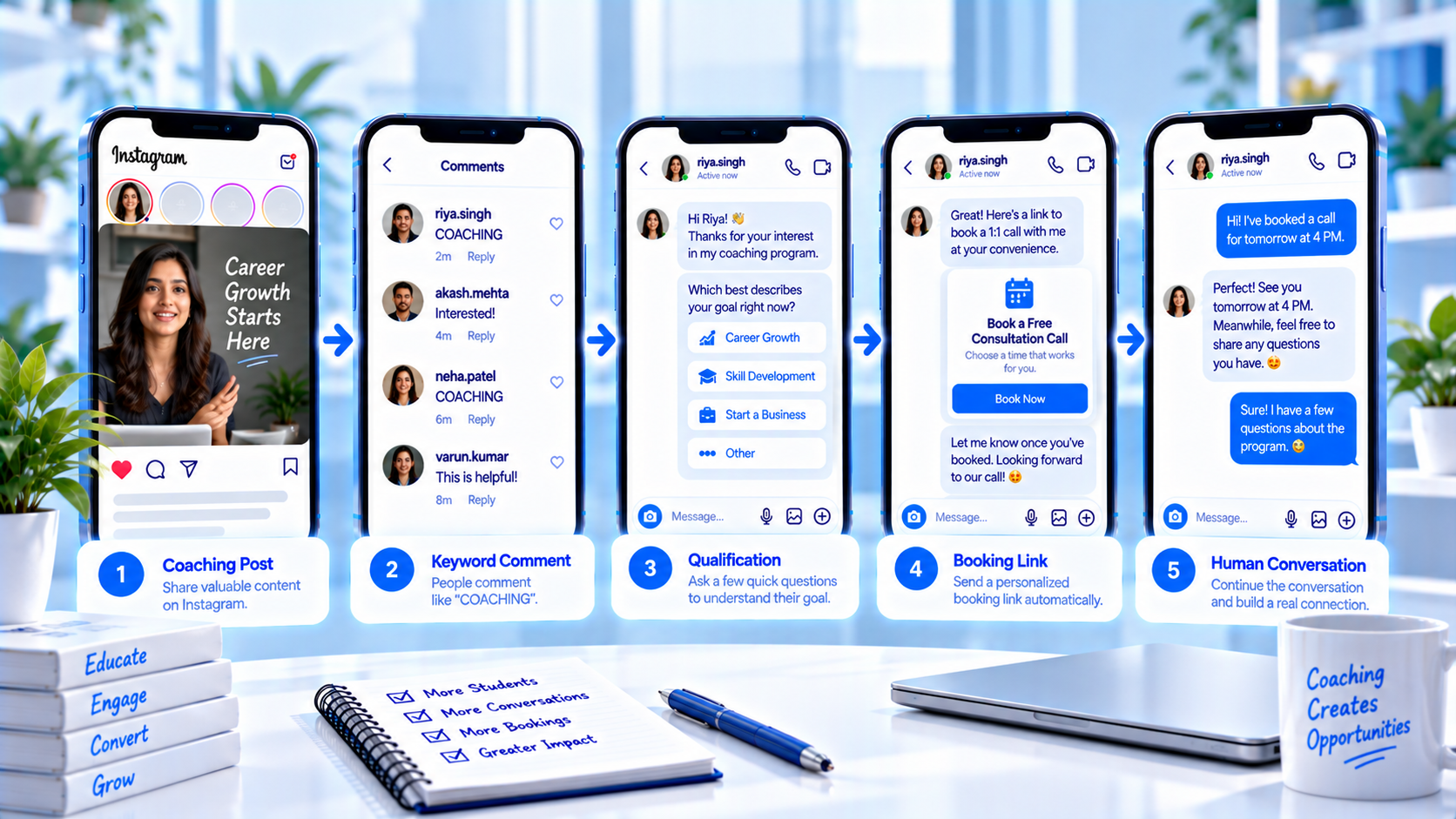
Coaches burn calendars on people who wanted a free plan, not a paid seat. Comment-to-DM should send the hello, name the offer, and ask the one fit question you actually use. It should not close the discovery call, invent a discount, or quote a custom package in a bubble you cannot stand behind. If you would not say the sentence on a Zoom with a colleague watching, do not put it in the first DM.
Story booking still exists for sticker replies — see booking links from Story replies. This article is the coach role on comments and inbound DMs: APPLY, BOOK, and the stop before a tyre-kicker lands on your Tuesday. Creators who want the wider setup can start at CommentLink for creators. Keep the classroom in the comments; keep the fit check in private.
What coaches should automate on Instagram
Automate the repetitive path: they commented APPLY, they get the one-pager and a question (timeline, role, or city). Automate the booking link only after that answer matches who you take. Do not automate custom pricing, trauma disclosure, or “can you guarantee placement.”
If you sell advice rather than a cohort, you are closer to consultants than to SKU shops. Pair high-ticket language with high-ticket qualification scripts, and keep SOWs human like consultants do.
How an APPLY comment becomes a fit check
- Reel teaches APPLY or BOOK in the caption, not only in a sticker.
- Comment matches. Private reply names the offer and sends the public one-pager or curriculum outline.
- You ask one question you will read (e.g. “manager of people / individual contributor” or “start in 30 days / just researching”).
- Condition: fit → calendar link. Not fit → resource plus a kind stop, no fake scarcity.
- They book. You run discovery. Custom pricing stays off the bot.
- If buyers live on WhatsApp, that hop is a link they choose later — not a silent jump from the comment. India-specific notes: Indian coaches and educators.
Sample coaching comments and qualification DMs
Leadership coach Reel. Caption: “Comment APPLY for the 8-week manager cohort outline.” Comment: APPLY. DM: “Outline: [URL]. One question so I don’t send the calendar to the wrong person: are you currently managing at least one person? Reply YES or NOT YET.” YES → Calendly. NOT YET → “This cohort is for managers. Here’s a free article instead. If that changes, comment APPLY again later.”
If they reply with a paragraph about their team instead of YES, that is a human read — do not loop “reply YES or NOT YET” three times. One fallback, then handoff. The point of qualification is to protect the calendar, not to win a keyword game.
Running coach. Caption: “Comment PLAN.” DM: “4-week base plan: [URL]. This is general training, not medical advice. If you’re returning from injury, don’t book the paid 1:1 from this DM — reply INJURY and I’ll take it.”
Comment: “What’s your rate for a custom exec package?” Do not auto-quote. Last line: “Custom packages are priced on a call. I’ll pick this up.” Tag: custom-price.
Building the coach flow without a closer bot
- Write the offer name exactly as it appears on the sales page.
- Teach one keyword per offer. Two cohorts means two words or two Reels.
- Put the outline in the first DM. Meta’s one-private-reply-per-comment rule means the payload cannot wait.
- Add one condition on the reply. If you will not read the answer, do not ask.
- Calendar only on the fit branch. Tyre-kickers get a resource, not your Tuesday.
- Human-handoff on PRICE, LEGAL, REFUND, and medical language.
Coaching mistakes that dump tyre-kickers on your calendar
- BOOK on every Reel including rant content. Instead: teach BOOK only next to the offer.
- Ten qualifying questions before any file. Instead: one question after the outline.
- Guaranteed job or income claims in the DM. Instead: no outcome promises.
- Auto-sending a discount code “because they commented.” Instead: public price or a human.
- Using AI reply to negotiate. Instead: handoff.
- Collecting trauma stories in a form node. Instead: stop and a person.
- Leaving APPLY live after the cohort closed. Instead: waitlist copy or pause.
Habits for high-ticket DMs
- Same price in the DM as on the page.
- Name the timezone on the calendar link.
- Public reply stays one line so the comments stay a classroom, not a bot wall.
- Review unfit replies weekly; maybe the question is wrong, not the audience.
Copyable coach qualification template
Trigger: comment APPLY on the cohort Reel. Send: outline URL + one fit question. YES → booking link. NO → resource + stop. Custom/PRICE/INJURY → handoff.
Staff opener: “I have APPLY on the manager Reel and your YES. Discovery is 20 minutes; we’ll only talk fit, not a hard close.”
Do not put a second offer in the unfit branch. That is how you train people to ignore you.
What the public reply is for on a teaching Reel
The comment thread is part of the class. If every APPLY comment gets a four-line public manifesto, people stop reading the real discussion. Use one public line: “Outline sent — check DMs / Requests.” Put the curriculum, the question, and the calendar in the private reply. That split is the whole point of comment-to-DM.
If you also run a Story sticker with the same keyword, keep the DM identical. Two different calendars for APPLY versus a sticker is how you double-book. Story booking basics are already documented; this article only insists the coach offer has one next step.
Cohorts, waitlists, and when APPLY must change
When the cohort closes, the DM cannot still send Calendly for that start date. Switch APPLY to waitlist copy or pause the keyword. A closed cohort that still books discovery is how you spend Tuesday on people you cannot take until next quarter — unless that is the job, in which case say “next cohort” in the first line.
Waitlist is a different promise: collect a way to reach them if you will actually write, then stop. Do not collect emails you will dump into a tool you do not open. CommentLink can collect a field; it is not a native HubSpot sync.
Custom pricing and discovery stay with you
If they mention procurement, a company workshop, or a number you do not publish, the flow is done. A human writes the next message. If they describe harm, crisis, or medical symptoms, do not coach in-thread; hand off or point to real help, depending on your professional rules.
Automation got them the outline. You still have to decide if they belong on the call.
Consult versus course: two comments, two destinations
Caption: “Comment FEES for the public page, APPLY for the cohort form — not both.” FEES sends the GST-true fees URL. APPLY asks one question (timezone or start month) then the form. If they comment FEES and then ask for a custom corporate workshop, that is human-handoff, not another PDF. Mixing those two jobs in one keyword is how a ₹4,999 course lead gets a 45-minute sales calendar.
CommentLink will not staff your discovery calls. The handoff node stops the bot; your calendar and your hours are yours.
FAQ
How do coaches use Instagram comment-to-DM?
Teach a keyword, qualify in the DM, send booking only to people who fit, and take custom pricing yourself.
Should every commenter get Calendly?
No. Send the outline first. Calendar on the fit branch.
Can I automate discovery questions?
One question you will use. A 12-question intake belongs on a form you actually read, after they opt in — or on the call.
What if they want WhatsApp?
Offer a number in the IG DM. WhatsApp automations start when they write that number, not from the comment.
Is this the same as consultant automation?
Similar shape, different assets. Coaches send outlines and cohorts; consultants send decks and SOWs. Custom work is still human.
Do I need a huge flow canvas?
No. Keyword → file → one condition → calendar or stop. Add nodes only when a real reply changes the next step.
Can I DM a WhatsApp number after FEES automatically?
Not from the comment. Offer the number in the DM if you staff WhatsApp; the hop is when they write there.
Related reading
CommentLink for creators
Turn comments, keywords, and Story replies into DMs so you keep creating while the conversation starts.
See creators