
Booking Links from Instagram Story Replies
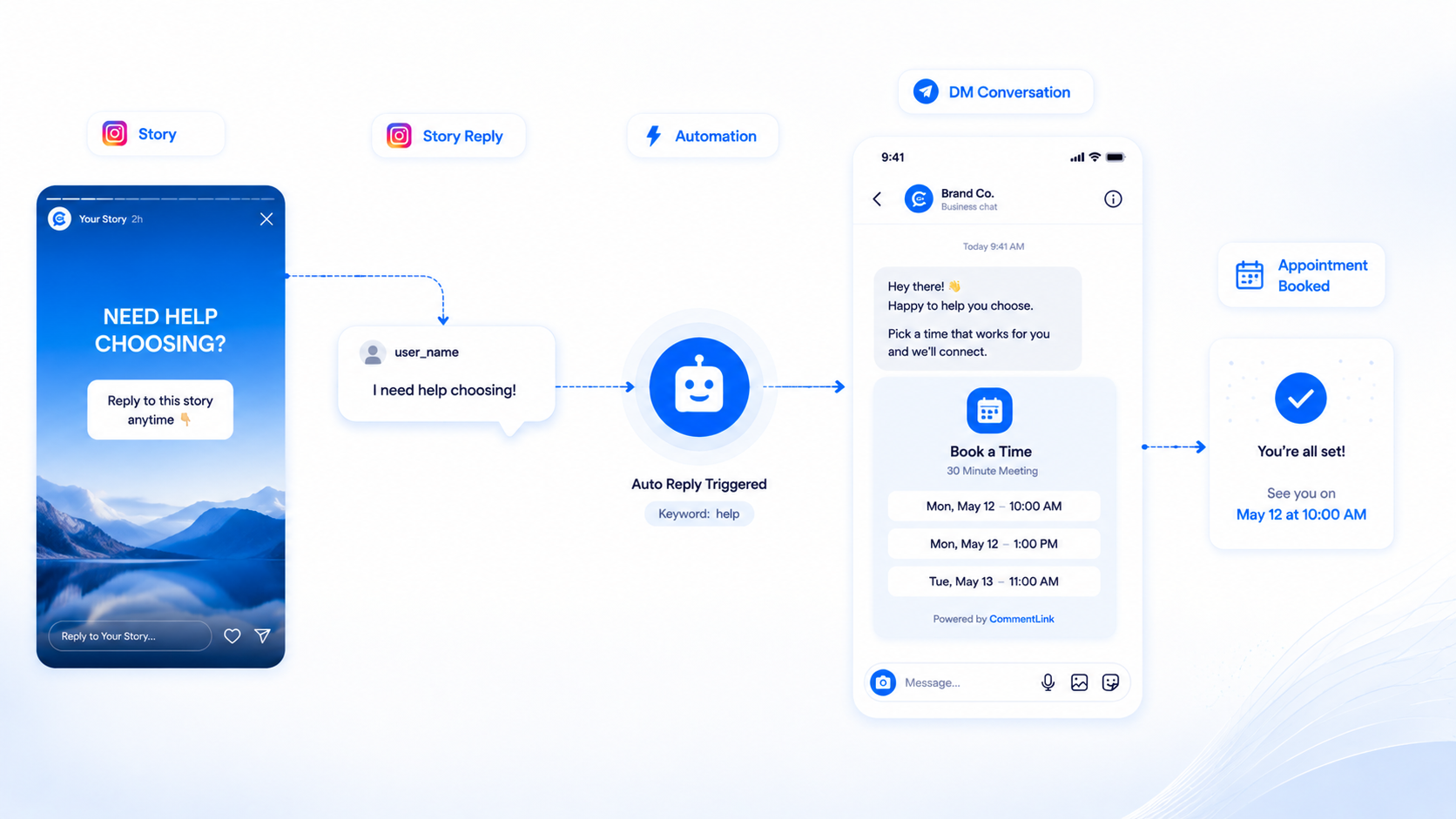
Instagram story booking automation means: someone replies to your Story (a sticker, a question, a plain message on the Story), and your Professional account sends a DM that contains the calendar or booking URL. In CommentLink that trigger is STORY_REPLY. It is not a feed-post comment rule. If you only armed comment-to-DM on a Reel, Story replies will sit there unanswered while the Story dies.
Stories expire. That is the whole product constraint. You cannot “queue for tomorrow” in the sense of the Story still being on their screen. You can still send the DM if Meta allows the messaging path; they may have forgotten why they wrote.
Story reply versus comment-to-DM
Feed and Reel comments use the comment engine (keyword or catch-all, optional public reply, optional follow-gate). Story replies are inbound messages attached to a Story. There is no public comment thread under a vanished Story. Put the “check your DMs” line in the Story itself (“Reply YES for the booking link”) so they know a DM is coming.
Story mention (STORY_MENTION) is someone tagging you in their Story — a thank-you DM, not the same as them replying to yours. Configure mention separately if UGC is the play.
Setup for a booking link
- Professional account, Page link, Meta login — same as every other AutoDM.
- Create a Story reply automation. Scope: all Stories or a specific live Story, depending on how you work.
- Optional keyword on the reply text (BOOK, YES, TIME). Or answer every Story reply if volume is low.
- DM copy: one sentence plus the calendar URL (Calendly, Google Calendar appointment schedule, your own booker). Do not send a PDF manifesto.
- Publish the Story. Say the keyword out loud. Test from a second account.
- Watch the inbox. Booking questions are human work after the link.
Public comment reply does not apply here. For feed posts that also book, use auto reply on the post plus this Story rule — two automations, two surfaces.
Copy and timing
Story: “Reply BOOK and I’ll send my calendar — slots this week.” DM: “Here’s the booking link: [URL]. If nothing fits, reply with a day.” First-time DMs may sit in Message Requests; say that in the Story if your audience is cold.
If they reply after the Story expired, you may still have a DM thread. Keep the same booking URL. Do not build a 12-step flow that outlives their interest. Further free-form follow-ups still depend on Meta’s messaging windows — 24-hour window article.
What not to expect
- A feed comment keyword will not fire on a Story reply.
- The Story will not last so you can drip for three days on the same sticker.
- CommentLink does not invent a native iOS Story composer.
- WhatsApp is not auto-opened because they replied to an IG Story. You may include a WhatsApp URL if they prefer that channel.
- Native Business Suite may cover parts of Story messaging; confirm in the current Meta UI. Do not assume CommentLink is the only legal path.
Coaches, clinics, and shops
Coaches: calendar URL. Clinics: intake or booking page, plus a human for medical questions — do not let a bot diagnose. Shops: Story reply can send a product URL, but “booking” should mean an actual appointment or reservation, not a vague “book a call” that is a sales trap. Welcome openers (up to four tappable buttons when someone opens IG inbox) can sit beside Story automations for people who write you cold rather than via the Story.
Operational habits
Staff the shared inbox while a booking Story is live. Close threads once the calendar holds a time. If a Story spikes, Instagram’s hourly DM cap still applies; overflow waits in the safety queue like any other IG send.
What to put on the Story versus in the DM
The Story is the invitation: show the face, say the keyword, show that a calendar exists. The DM is the URL. Putting the full booking link only in the Story sticker can work until Instagram’s link stickers fight you; many operators still want the DM because it survives in the thread after the Story expires. The reply automation is what catches people who typed instead of tapping a sticker.
If you use a question sticker, answers still arrive as Story replies. Test whether your keyword rule matches those answers. If you answer every Story reply, you will also DM the “nice pic” comments. That can be fine for a coach with volume of ten. It is not fine for a brand Story.
After the Story expires
The trigger stops making sense as a live surface. Existing DM threads remain. You can still send the same calendar URL if Meta allows the conversation. You cannot resurrect the sticker. Arm the next Story rather than trying to drip on a corpse. Upcoming post automation is for feed/Reel publish, not a Story time machine.
Mentions are a different automation
When they tag you in their Story, that is STORY_MENTION. Thank-you plus a code is a UGC play. It is not “they asked for a booking link.” Do not reuse the booking copy on mentions unless you want to look like you ignored the tag. Configure mention separately.
Clinics and regulated offers
A calendar link is not medical advice. If the Story implies a diagnosis, take the automation down and use a human. The same applies to financial booking. CommentLink will send whatever URL you configured; it will not review your licence.
A booking Story that does not lie
Show the calendar honestly: timezone, duration, whether the call is sales or delivery. The DM should not promise a slot the calendar does not have. If you use COLLECT_EMAIL before the link, say that in the Story so the reply is not a surprise form.
Test from a second account while the Story is live. Confirm the keyword. Confirm Message Requests. Confirm the URL opens the right event type. Then leave the inbox staffed until the Story dies.
If you also have a feed post with comment BOOK, that is a second automation on a second surface. Do not expect the Story rule to catch Reel comments. Do not expect the Reel rule to catch Story replies. Two triggers, two tests.
After expiry, send the booking URL only in threads Meta still allows. For the next Story, change the keyword if the last one leaked to spam replies. Welcome openers can cover people who skip Stories and write the inbox cold — up to four tappable buttons, not a calendar host.
If the calendar is the product, keep the DM to one URL. Extra pitch decks in the same message are how people bounce. If they reply with times that do not exist, a human in the shared inbox should offer two real slots rather than another automated paragraph. Story reply automation starts the booking; it should not finish a negotiation.
Story reply versus feed comment-to-DM, once more
If someone comments BOOK on a Reel, that is the comment engine. If someone replies BOOK on a Story, that is STORY_REPLY. Configure both if you use both surfaces. Test both. Staff the inbox while the Story is live. When it expires, stop expecting new matches from that sticker. The calendar URL in the DM is the payload; the Story is only the invitation.
FAQ
Is STORY_REPLY the same as commenting on a Story?
People “reply” to Stories in DMs. That inbound message is the trigger. It is not a feed comment.
Can I require a follow before the calendar link?
If you attach a follow-gate to that automation, the same tap-then-API-check applies. Extra friction on a 24-hour Story loses people; use it only if non-followers are flooding you.
What calendar should I use?
Any URL you would paste by hand. CommentLink does not host the calendar.
Do emoji reactions count as replies?
Treat reaction behaviour as something to verify in a live test on your account. Configure keywords if you only want people who typed BOOK.
Can I arm this before I post the Story?
You can leave a Story reply automation on for all Stories. Upcoming post automation is for feed/Reel publish, not a substitute for the Story trigger.
What if they reply after the Story expired?
You may still have a DM thread. Send the same booking URL if Meta allows the conversation. Do not expect the sticker to still be on their screen. Arm the next Story for the next wave.
Should I keyword-gate Story replies?
If volume is low, answering every reply can be fine. If the Story is a brand moment, require BOOK or YES so “nice pic” does not get a calendar. Test sticker answers against the rule.
Can the DM include WhatsApp instead of a calendar?
It can include a wa.me URL. That is still an Instagram DM. It does not create a WhatsApp API send from a Story reply.
Related reading
Auto-reply to Story replies with a booking link
Configure a Story reply automation: they reply to the Story, they get the calendar URL in DM while the Story is live.
Try CommentLink FreeRelated articles
Instagram Automation Dashboard: What to Track Weekly
A weekly checklist: connection health, queue depth, failed sends, and one campaign metric — not 40 vanity charts.
How to Track Instagram DM Leads by Post
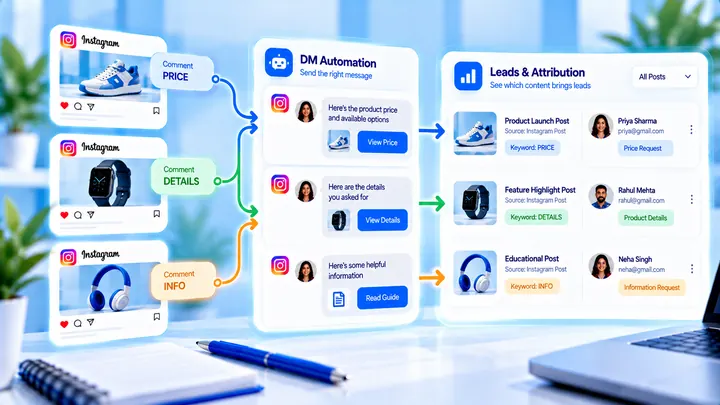
Know which Reel created conversations — name campaigns, use UTMs, and do not mix every keyword into one bucket.
How to Measure Leads from Instagram Comments
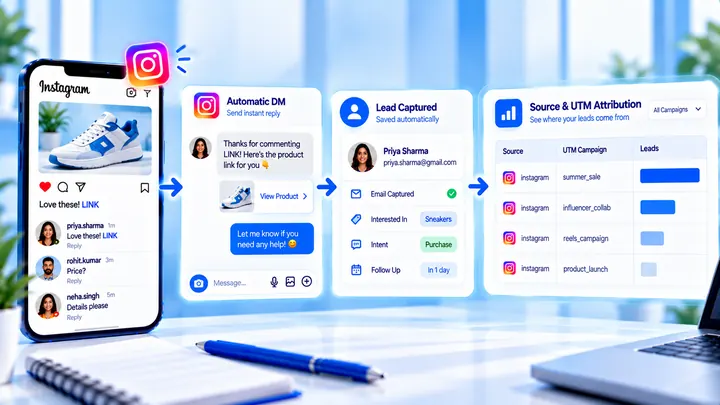
A lead from a comment is a contact you can follow up — not a comment count. Wire keyword → DM → email or UTM before you celebrate.