
Instagram Story Reply Automation
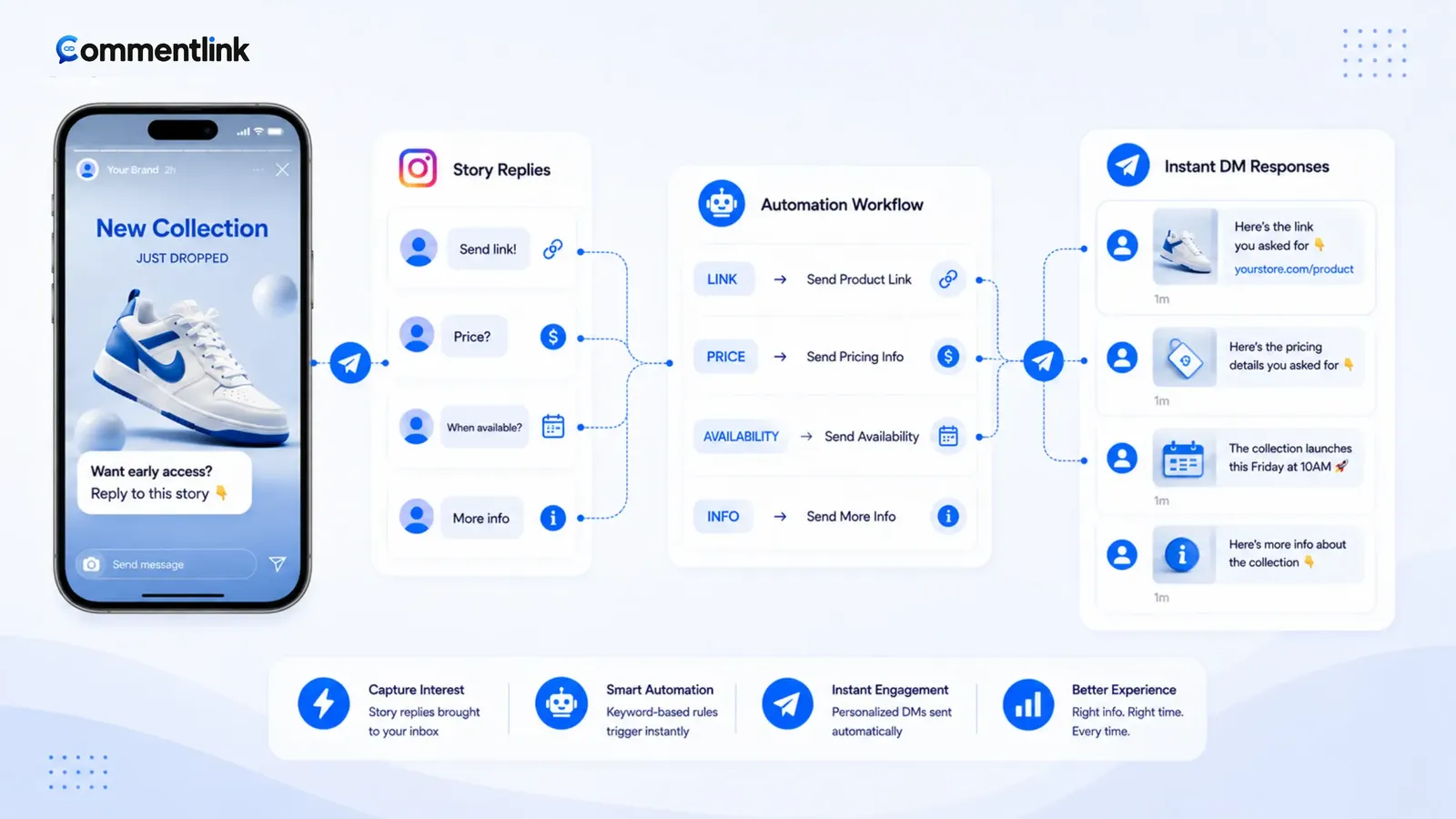
Instagram Story reply automation means: when someone replies to your Story, an automation can send a private Instagram DM — text, a link, a button, or a short flow — while that Story is still live. It is not the same as a comment under a Reel or feed post.
A Story reply is a DM, not a comment under a Reel. CommentLink’s STORY_REPLY trigger watches that inbound message. A feed or Reel comment-to-DM rule will not fire when someone taps reply on the Story sticker. If you set only the comment engine, the Story will expire with unanswered replies and you will blame the wrong automation.
Category page: Instagram auto reply. Broader DM surfaces (comments, Stories, inbox) sit under Instagram DM automation. Story mention (they mention you in their Story) is a sibling trigger — thank-you / link DM — not the same event as a reply to your Story. Configure the one you actually use.
Arm the trigger before you post. Put the reply word on the frame. Keep the DM short. When the Story dies, change tomorrow’s password so you do not send yesterday’s drop code. Professional account and a Facebook Page still required. Viewers who never replied are not a blast list.
What Story reply automation is (and is not)
Someone opens your Story and sends a reply. That inbound Instagram message can start your flow. The automation runs on official Meta OAuth for a Professional account linked to a Facebook Page — the same family of APIs as other Instagram messaging automations.
- It is a reply to your Story → private DM.
- It is not a feed/Reel comment rule.
- It is not a blast to everyone who only viewed the Story.
- It is not guaranteed to behave the same on Highlights as on a live 24-hour Story — test the surface you use.
Why Stories are a clock, not a post
A feed comment can sit for weeks. A Story is gone in 24 hours. The reply window is the same window as the asset. If you publish the Story first and build the automation after lunch, you missed the morning replies forever. Arm STORY_REPLY (and STORY_MENTION if you use it) before you record, the same way you arm upcoming posts for feed launches.
When the Story expires, new replies stop. Old threads in the inbox remain. Automation does not resurrect an expired Story. Plan the CTA for that day: price list, booking, drop password, not a week-long funnel that assumes they can still see the frame.
Practical use cases
- Menu or price list: “Reply MENU for today’s list,” DM sends the PDF or URL.
- Booking: “Reply BOOK,” DM sends the calendar link.
- Drop password: “Reply DROP,” DM sends today’s code — change it when the Story ends.
- Lead magnet: “Reply GUIDE,” DM sends the landing page; optionally collect email in the next step.
Keep one clear ask per Story. Six overlapping keywords on six frames in one hour is how teams lose track of which trigger fired.
What STORY_REPLY actually matches
Someone opens your Story and sends a reply (text, emoji, reaction-as-reply depending on what Instagram sends the API). That inbound Instagram message can start your flow: text, buttons, a URL, a collect-email node, a follow-gate. It is still Instagram DMs — official Meta OAuth, Professional account, Facebook Page.
You can still keyword-filter Story replies (YES, LINK, SIZE) so a random “🔥” does not get the checkout DM. Catch-all on Stories is tempting and noisy. If the sticker said “reply YES for the menu,” match YES.
Story mention is not a reply
STORY_MENTION is when they put you in their Story. Use it for UGC thank-you DMs or a code. Do not expect mention automations to fire on replies to your own Story, or the reverse.
Basic setup / workflow
- Connect Instagram with Meta login in CommentLink.
- Enable STORY_REPLY. Add a keyword if the frame teaches one; otherwise decide catch-all with eyes open.
- Write the DM (link, button, or short flow). Optional follow-gate only if the Story said so.
- Post the Story with the same word on screen.
- Reply to it from a second account immediately. Check Message Requests.
- When the Story ends, turn off or switch copy so yesterday’s password is not sent tomorrow.
If your main job is comments under posts and Reels instead of Stories, use comment-to-DM for that surface — Story reply will not cover it.
Copy and stickers that match the trigger
On the Story, write the reply word on the frame. A question sticker is not automatically a CommentLink trigger — the API event is the reply message. Teach the word you will match.
Keep the DM short. They are mid-scroll. Send the menu PDF or the booking URL. If you need an email, collect in the next message; do not lecture.
First-time Story repliers still hit Message Requests. A Story cannot host a public comment reply the way a Reel can. Put “check Requests” in the Story text itself. Public-vs-private lessons from feed posts still apply to the DM payload — public reply vs private DM — but you will not get a thread under the Story.
Limits and considerations
A busy Story can burn the hourly automated-DM cap the same as a Reel. CommentLink queues; you cannot invent quota. If you go live-style with a new Story every ten minutes, you are stacking inbound replies. Prefer one clear CTA Story over six overlapping asks.
Welcome openers (up to four on free) can still show when someone opens the inbox. That is parallel to Story reply, not a replacement. Do not turn off STORY_REPLY because openers exist.
Meta’s native Business Suite surfaces change over time. Do not assume Custom Keywords on a post cover Story replies — confirm in Business Suite if you rely on native tools. CommentLink treats Story reply as its own trigger.
What this will not do
- It will not keep the Story live past 24 hours.
- It will not fire on feed comments. Use the comment engine for Reels and posts.
- It will not send WhatsApp because they replied to a Story.
- It will not log in with a password or scrape viewers who did not reply. Viewer lists are not a CommentLink blast list — and cold DMs are out of scope.
Allowed official automation vs bots: is Instagram comment automation allowed.
A 24-hour Story sequence that does not collide
Frame 1: the content. Frame 2: the ask with the reply word on screen. Frame 3 (optional): “If I already DMed you, check Requests.” Do not post six Stories that each teach a different keyword at once unless you enjoy debugging which trigger fired.
Highlights are not live Stories. Replies to a highlight are not guaranteed to look like a STORY_REPLY to a 24-hour item. Test the surface you actually use. Do not promise highlight automation you have not verified on a second account.
Overnight: if you post at 11pm, replies still arrive. Queue will send when cap allows. A human should still own weird replies (“this is the wrong shop”) in the shared inbox in the morning.
Emoji-only replies
If the sticker said “reply with a 🔥,” matching is fragile across devices and API payloads. Prefer a word. If you insist on emoji, test three devices and still add the word as backup on the frame.
Catch-all on Stories will DM people who replied “ok” to a poll you forgot was attached. Keyword-filter unless the Story is a one-off launch password.
Story reply versus every other Instagram trigger
Feed comment-to-DM: they typed under a post or Reel. Public reply is available. Media lives for weeks. Story reply: they messaged a disappearing frame. No public thread. Twenty-four hours. If your team only built comment rules, Story replies sit unanswered and you will hear “automation is down” when the trigger was never on.
Story mention: they put you on their frame. Different event. A mention thank-you DM can include a code. A reply DM is for people who answered your CTA. Mixing the two copy decks is how a mention gets a “thanks for commenting PRICE” message that makes no sense.
Welcome openers: up to four tappable buttons when someone opens the inbox. Useful for “book / menu / human.” They do not fire because of a Story. A person can get a Story-reply DM and later see openers. That is fine. Do not disable STORY_REPLY because openers exist.
Live-style posting: new Story every hour with a new password needs a DM edit every hour. Prefer one CTA Story per campaign day. If you must rotate, change the automation copy when you change the frame — leftover passwords are a support queue.
Testing: the second account must actually reply to the live Story, not comment on a leftover Reel. Check Requests. Confirm the keyword. Then expire the test Story so you do not leave “TEST” as the public CTA. Professional plus Page still required. Password tools that claim to DM every viewer are not this product.
FAQ
What is Instagram Story reply automation?
It is an automatic private DM (or short flow) sent when someone replies to your Instagram Story. It uses a Story-reply trigger, not a feed comment rule.
Can native Business Suite do Story auto-reply?
Meta’s native surfaces change. Do not assume Custom Keywords on a post cover Story replies. Confirm in Business Suite. CommentLink treats Story reply as its own trigger.
Do Story replies count as comments for comment-to-DM?
No. Different event. Attach the right trigger. A feed comment rule will sit polite and idle while Story replies pile up in the inbox unanswered — that looks like an outage and is usually a missing STORY_REPLY switch.
What happens after 24 hours?
The Story is gone. The trigger will not see new replies to that Story. Existing DMs remain in the inbox.
Can I send a link in the Story reply DM?
Yes. That is the usual payload. Disclose affiliates. Do not cold-DM people who only viewed.
What if they reply with only an emoji?
If your keyword is YES, a heart will not match — that is correct. Catch-all will match and may waste cap. Prefer a word on the frame. Emoji-as-CTA is fragile across devices and API payloads. Test three clients if you insist, and still print the word as backup.
Do highlights keep STORY_REPLY alive?
Highlights are not the same as a live 24-hour Story. Do not promise highlight automation you have not tested on a second account. When the live Story ends, new replies to that Story stop. Inbox threads remain. Change tomorrow’s password so yesterday’s drop code is not sent to a new reply on a new Story.
Story mention versus Story reply — which should I turn on?
Reply: they answered your Story. Mention: they put you on theirs. Turn on the event you will actually get. A creator who asks “reply MENU” needs STORY_REPLY. A brand hunting UGC needs STORY_MENTION. Copy should not be interchangeable. Both still need Professional, a Page, and Meta OAuth — and neither is a viewer blast.
Related reading
Answer Story replies while the Story is live
CommentLink can send an automatic DM when someone replies to your Instagram Story. Feed comment automations will not catch that message.
See Instagram auto replyRelated articles
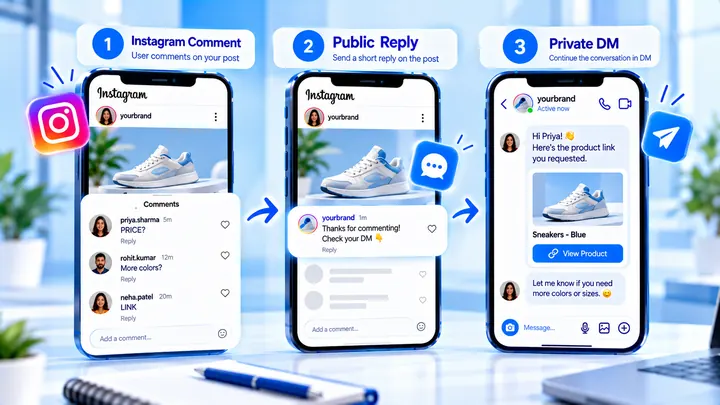
Use a Public “Check Your DMs” Reply Without Spamming
A one-line public “check your DMs” reply helps people find Message Requests. Repeating it on every comment can make the thread look automated and loud.
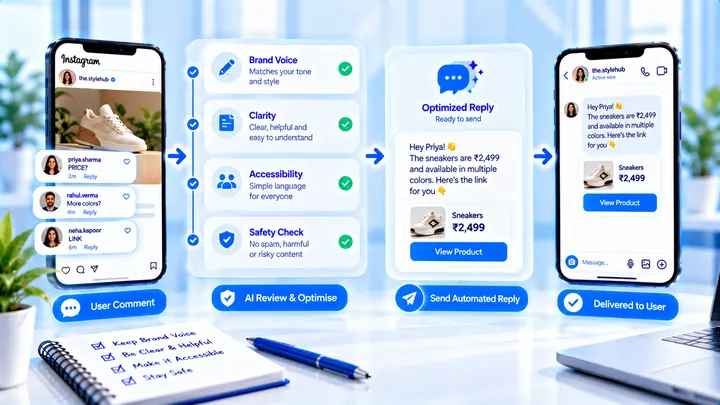
Brand-Safe Instagram Auto Replies (Without Sounding Robotic)
Keep Instagram auto replies on-brand: honest promises, readable language, and a public line that does not clone itself down the thread.
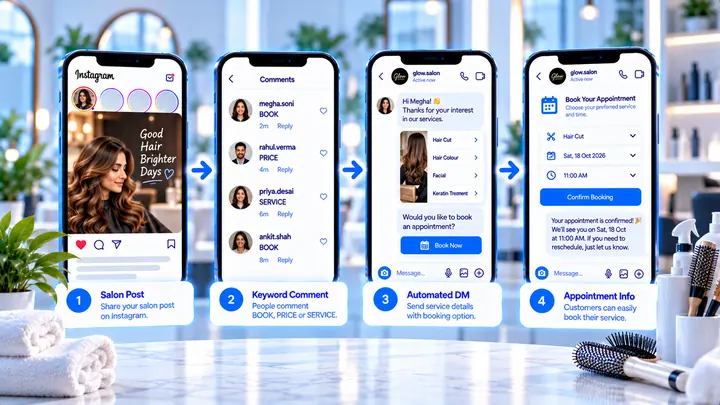
Instagram Automation for Salons
BOOK and PRICE comments can send the booking link while chairs are full.