
Instagram Automation Workflow Examples You Can Copy
Workflow examples should be short enough that a tired operator can rebuild them after a launch week. CommentLink’s canvas includes send, delay, condition, tags, collect email/phone, follow-gate, AI reply, HTTP request, and human-handoff. Use the smallest graph that does the job. If you are still choosing shape, start with simple vs multi-step. A bakery box keyword does not need collect-email plus HTTP plus AI.
These are patterns, not a 40-node canvas nobody will maintain. Branching detail lives in branching logic. Handoff design: human handoff workflow. Copy one example. Add a node only when a real reply changes the next step. Name the automation after the letter (A BOX, B PRICE) so the next person can find it.
Why copy small Instagram workflows
Large graphs rot. Offers change, URLs break, and the person who built “Untitled 12” left. A four-node pattern you can explain in a standup will outlive a masterpiece. The examples below are jobs: send a file, qualify then send, gate then send, collect then hand off, stop for a human.
They all assume official Meta login, a taught keyword, and the first DM carrying the payload because Meta allows one private reply per comment unless they answer.
How to read a workflow sketch before you build
- Find the trigger (comment keyword, Story reply, inbound DM).
- Find the first send. If the prize is missing there, fix that before adding branches.
- Find the one if. If there is no if, you wanted simple.
- Find the stop: end, gate fail, or handoff.
- Ignore delays unless you have a real waiting reason that still fits messaging windows.
- Build in the product only after the sketch fits on one page.
Five comment-and-DM examples you can steal
Example A — bakery preorder. Caption: “Comment BOX for this weekend’s pastry box.” Comment: BOX. DM: “Saturday box: [URL]. Cutoff Friday 2pm. Check Requests.” Public: “Sent.” Stop. No branch.
Example B — qualify then send. Boutique fitness. Comment PRICE. DM: “Intro week is on the site: [URL]. Are you booking for 1 person or a team? Reply 1 or TEAM.” 1 → intro checkout. TEAM → corporate one-pager. Fallback → “Reply 1 or TEAM.” See qualification flow.
Example C — follow-gate then link. Newsletter PDF you will not give tourists. Comment GUIDE. Gate card → PDF. Product behaviour: how follow-gates actually work. Do not gate ISSUE.
Example D — collect then handoff. Workshop waitlist. Comment WAIT. DM: “I’ll add you if you share an email I can actually use.” Collect email → tag waitlist → “A producer will confirm seats.” Human-handoff. Criteria: sales handoff criteria.
Example E — stop for a human immediately. Comment: REFUND on a product Reel. Last line: “I’m passing you to support. We’re on weekdays 10–6 IST.” Tag refund. No second SKU.
Write the comment and the first DM in the same sitting as the Reel caption. If the caption says BOX and the rule says PASTRY, you will test nothing useful. If the DM URL 404s, the graph quality does not matter. Examples fail in the caption and the link more often than in the canvas.
Implementing one example at a time
- Pick A–E. Do not merge them into one graph on day one.
- Create the keyword on the live media only.
- Test with a second account: follower and non-follower.
- Ship. Watch ten real replies before you add a node.
- If the same question appears ten times, that is your first branch — not a reason to copy all five examples at once.
Graph mistakes that nobody will maintain
- Five examples in one automation. Instead: one job per rule.
- HTTP to a CRM that is not connected. Instead: skip; no HubSpot native sync.
- AI reply after REFUND. Instead: handoff.
- Follow-gate on BOX when you want weekend volume. Instead: send the box link.
- Collecting phone you will never call. Instead: do not collect.
- Untitled nodes. Instead: name BOX / TEAM / HANDOFF.
- Rebuilding native ManyChat templates node-for-node. Instead: rebuild the job.
Habits for keeping examples small
- Delete the branch you have not seen in 30 days.
- Keep URLs in a doc next to the keyword.
- Same public one-liner across simple examples.
- Handoff phrases shared with the rest of the account.
Copyable example sheet
A: keyword → URL → stop.
B: keyword → question → two URLs.
C: keyword → follow-gate → URL.
D: keyword → collect → tag → handoff.
E: keyword → last line → handoff.
Write which letter you shipped in the automation name.
How to test each letter before a launch Reel
Example A: comment BOX from a non-follower, confirm the URL and Requests. Example B: reply 1 and TEAM from two test accounts, confirm two different URLs, then type HELLO and confirm fallback. Example C: do not follow, confirm the gate card, follow, tap, confirm the PDF. Example D: send a fake email, confirm the tag, confirm a human sees it. Example E: comment REFUND, confirm no second SKU.
If any letter fails, do not “fix it in production” on a paid collab. Fix the node names and the live URL. A copied workflow with last month’s checkout link is a refund machine.
Keep a note: date tested, test @handles, which folder the DM landed in. That note is more useful than a screenshot of a 40-node canvas.
When not to copy an example
Do not copy C (follow-gate) onto a weekend pastry box you want volume on. Do not copy D (collect) if you will not email. Do not copy HTTP because a SaaS template had it — CommentLink is not a native HubSpot or Salesforce sync. Do not copy AI reply onto REFUND. The examples are jobs, not a set you must complete.
If your Reel is a collaboration, test whose account receives the comment event before you attach A–E. Caps are per account. Two brands sending two BOX links is uncoordinated, not “more automation.”
Where each example should stop for a human
A stops after the URL unless they say allergen or complaint. B stops when they type a company legal request. C stops if they insist they follow and the check fails — send once as a human. D is already a handoff. E is a handoff. Do not add a “just checking in” delay after any of them.
If the example no longer matches the Reel, pause it. A copied workflow that sends last month’s box is worse than no workflow.
Example F: Story reply that still stays four nodes
Story sticker: “Reply NOTES for the setlist.” They reply NOTES. DM: “Friday order + door time: [URL]. Check Requests.” Stop. Same job as example A, different trigger. Do not add collect, gate, and HTTP because the canvas was open. Story is another door, not a reason to complete the set.
If the Story is a paid collab, test whose account receives the reply before you attach F. Two brands sending two NOTES files is uncoordinated. Caps are per connected account.
Pausing a copied letter when the Reel dies
Example A with last month’s pastry box URL is a refund machine. When the weekend box ends, pause BOX or point it at the new URL the same hour you change the caption. Name the automation A-BOX-12JUL so the next operator can find it. Untitled 12 is how letters rot.
- Collab Reel: confirm which account’s A–E is live before publish.
- Do not leave C (gate) on a volume box you copied from a magnet post.
- Do not leave D (collect) on a keyword you will never email.
What these examples cannot do
They cannot sync to Shopify as a catalog, post into a Broadcast Channel, trigger Trial Reels, or silently open WhatsApp because someone commented BOX. HTTP to a CRM you do not have is not example G. AI reply after REFUND is not a clever E. Copy the job. Do not collect a badge for using every node.
FAQ
Do I need a huge Instagram flow?
No. Copy the smallest example that matches the job. Add nodes only when a real reply changes the next step.
Which example should a shop start with?
A — keyword to link. Add B when you are tired of answering the same split.
Is follow-gate required?
No. It is example C for magnets you refuse to give tourists.
Can I collect email in CommentLink?
Collect nodes exist. Use them if you will actually email. There is no HubSpot/Salesforce native CRM.
Where does handoff fit?
Example E, the end of D, and any refund/legal line on A–C.
Should I copy all five on one Reel?
No. One job per media. Extra keywords belong on extra posts.
Can I use the same letter on a Story sticker?
Yes if the job is the same. Story is another trigger, not a reason to add collect and HTTP. Test whose account receives the reply on a collab.
What do I do when the weekend offer ends?
Pause or retarget the URL the same hour. A copied A with a dead checkout is worse than no workflow.
Is there an example for Shopify catalog sync?
No. CommentLink is not a Shopify catalog. Send the product URL they asked for.
Related reading
See Instagram DM automation
Comments, Stories, keywords, follow-gates, lead capture and a shared inbox — official Meta APIs.
See DM automationRelated articles
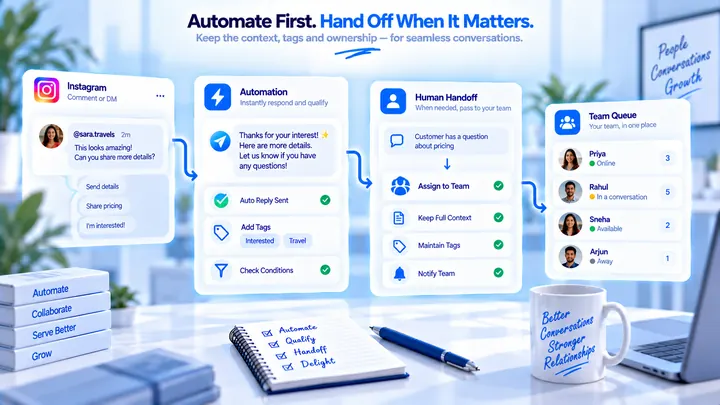
Human Handoff Workflow Design for Instagram DMs
When to stop the bot, who owns the thread, and what the human sees — CommentLink has a human-handoff node; it is not magic staffing.
Simple Instagram Automation vs Multi-Step Workflows
A keyword DM is enough for a link. Flows earn their keep for questions, tags, and handoff — not because a competitor has a canvas.
Instagram to WhatsApp Handoff After a Comment Lead
Comments stay on Instagram. A WhatsApp hop is a link or a number they choose — not a silent API jump.