
Product Drop Playbook: Comment-to-DM for Instagram Ecommerce
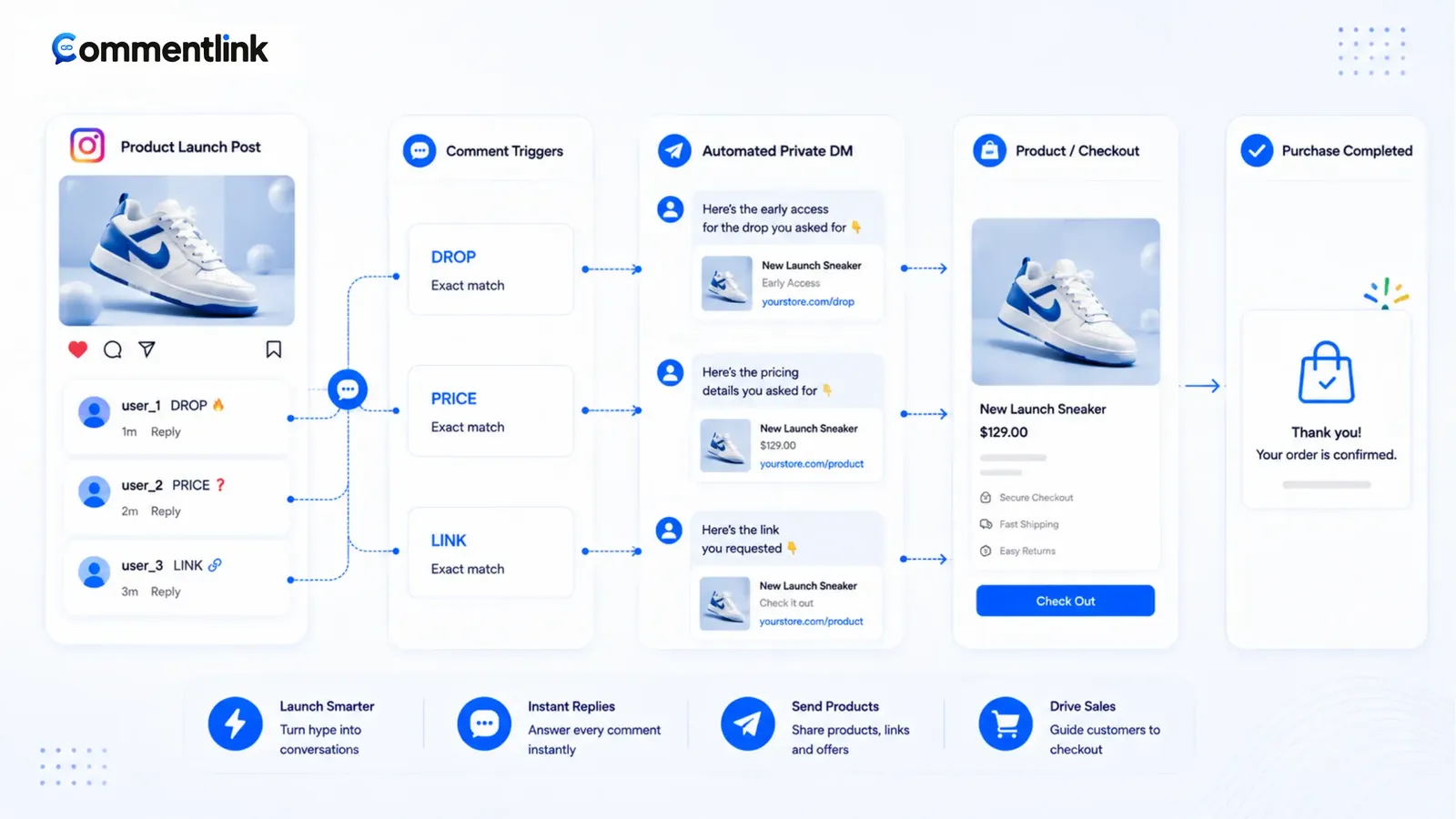
Ecommerce drops on Instagram fail in predictable ways: the checkout URL is still a homepage, the caption says link in bio while the bio still points at last month’s collection, and the automation is built after the Reel is already in Explore. Comment-to-DM is the per-SKU pipe. It is not a replacement for inventory truth or a paid ads account.
Playbook below assumes official APIs only — Professional account, Facebook Page, Meta login. Native Custom Keywords can run a simple DROP keyword. A workspace adds queue, matching, public+DM, follow-gate, and collect. Start: comment-to-DM.
Seventy-two hours out, freeze the SKU URL and the on-screen word. Arm upcoming for Reel if that is the format. Teasers should not send Tuesday’s checkout. SIZE and DROP are different payloads — do not let contains overlap them. When inventory dies, edit the DM the same hour; the queue will otherwise spend cap on a 404. Staff the shared inbox for questions the keyword missed. Bio stays as a fallback. WhatsApp stays a separate channel — comments still create Instagram DMs. One official sender per keyword. Professional plus a Facebook Page. No password bots, no cold DMs to viewers. If native Custom Keywords is the whole drop, attach as soon as the Reel exists and accept the first-minute miss — or use upcoming so you do not. UTM the DM URL so you can tell comment clicks from bio taps without inventing a lift story. Watch the first hour for queue versus drop, then fix copy, not vendors, if Requests are the miss. Assign one person to inventory copy and one to the keyword list so two staff do not send two discount codes. Retire DROP when the drop is over so late comments do not get a dead password from yesterday’s checkout URL.
Seventy-two hours before
- Freeze the SKU URL. UTM it if you care which Reel converted. Do not DM a Linktree and hope.
- Pick the trigger word that will be on the graphic: DROP, the colourway, SIZE. Not “interested.”
- Arm upcoming post automation for the format you will publish (usually Reel).
- Write the DM: size note, shipping cutoff, URL or button. One screen of text.
- Decide follow-gate: on for stranger hype, off for a list that already follows the shop.
- Decide collect-email only if you will actually email restocks — not as decoration.
If the drop is a Story, that is STORY_REPLY, not upcoming feed. Do not mix them. Send-link basics: send a link when someone comments.
Teaser posts are not drop posts
A Monday teaser should not catch-all into Tuesday’s checkout DM if checkout is not live. Either no automation, or a DM that says the drop time and nothing else. Sending a 404 is how you train people to ignore DROP on the real day.
Tuesday live post: switch or enable the real URL. If you used upcoming, the rule should already be waiting. If you used native, attach Custom Keywords as soon as the Reel exists — know you may miss the first minutes.
Caption pattern that converts to checkout
“Comment DROP for this colourway’s checkout in DMs (Requests). Sizes in the DM. Bio has the full shop if you would rather browse.” Two doors, one specific URL in the DM. Do not lie that the bio is the only path or that comments are the only path.
Public one-liner plus private URL: public reply vs private DM. Price wars in the comments are why PRICE as a public reply is a bad default — send the price list privately if that is the fight you want to avoid.
First-hour operations
Instagram’s automated-DM cap will show up if the drop works. Native drops the tail. CommentLink queues. Staff the shared inbox for people who ask SIZE in a way your keyword missed — handoff beats a second bot.
Sold out: change the DM to waitlist or email collect. Do not keep sending a checkout that 402s. Upcoming rules do not magically know inventory; you do.
WhatsApp belongs in the same inbox for people who already write you there. Do not auto-open WhatsApp from the Instagram comment.
Size, preorder, and restock are not the same drop
SIZE should DM a chart, not yesterday’s sold-out checkout. DROP should DM the live SKU. RESTOCK can collect email. If contains “stock” matches both restock jokes and DROP, you will send the wrong payload. Separate tokens.
Preorders: the DM must say ship date. Comment-to-DM will not save you from a surprise delay. Update the message when the date slips; upcoming rules do not know production.
Restocks of an evergreen SKU can stay attached to one carousel. True drops deserve a fresh Reel, a fresh upcoming rule, and a keyword you retire after 48 hours.
Inbox during the hour it works
Assign a human in the shared Instagram+WhatsApp inbox for “is there a 38?” comments your keyword missed. Handoff beats a second automation. Notes on the contact stop two staff sending two discount codes.
If you also run WhatsApp for VIP clients, that is a parallel channel. Do not tell commenters you will WhatsApp the drop. You will not, not from the comment.
After the drop
Turn off or retarget the keyword so late comments do not get a dead drop password. Evergreen product posts can keep a SIZE or LINK rule attached to that media.
Compare: comments matched, DMs sent, link clicks, orders. If clicks are fine and orders are not, the landing page is the problem. If comments are fine and DMs are not, check Requests copy and the cap.
Stack you should not invent
- Two vendors plus native all matching DROP on one Reel.
- Password-based “drop bots.”
- Cold DMs to people who viewed but did not comment.
- A follow-gate on a restock Story you told existing followers to watch.
Ecommerce comment-to-DM recipes
Single-SKU Reel: keyword DROP or the colourway. DM: two sentences, size note, button to that SKU. Public: “check Requests.” Bio: full shop. Upcoming: Reel. Gate: off for warm, on for Explore-only hype you disclosed.
Size confusion: keyword SIZE, different automation, chart image or URL. Do not contains-match “size” on a DROP post if every “what size is she wearing?” should not get checkout. Separate media or separate exact tokens.
Cart on a landing page that already UTM-tags ads: use a distinct UTM on the DM so you can see whether comments paid for themselves. If ads drive profile visits, the bio still matters. Comment-to-DM is for people who stay on the Reel and do what you asked.
Sold out mid-hour: edit the DM to waitlist or COLLECT_EMAIL. Leaving a 404 in a queue is how you spend the hourly cap on anger. Native users must edit Custom Keywords copy the same way — the vendor does not know inventory.
Team: one person owns the keyword list, one owns inventory copy, inbox shared. Two tools on DROP is forbidden. WhatsApp for wholesale stays a separate channel. Instagram comments stay Instagram DMs.
FAQ
Should every product photo use comment-to-DM?
No. Evergreen catalogue shots can use the bio. Drops and single-SKU Reels are where per-media DMs earn the extra step.
Can I send different URLs for SIZE versus DROP?
Yes if you run separate keywords and copy. Do not overlap contains rules so both fire. One sender per comment.
Is Shopping tags a substitute?
Product tags help people who tap the tag. They do not replace a DM for people who comment because you asked them to. Use both if you have catalogues.
Do I need Business rather than Creator?
Shopping features are easier on Business. DM automation itself needs Professional plus a Page, either badge.
What belongs in the drop DM versus the caption?
Caption: the word, that DMs may queue, Requests, bio as fallback. DM: SKU URL, size note, ship cutoff, sold-out truth. Do not put a 404 in a queue. Edit the message when inventory dies. Public price wars belong in a private PRICE automation if you need them at all — not as a public reply under every DROP comment.
How do I run SIZE and DROP without double sends?
Separate tokens and, if possible, separate media. Contains “size” on a DROP Reel will fire on “what size is the model?” if you are not careful. Exact tokens or excludes help. One official sender per comment. Native plus CommentLink on DROP is how customers get two checkouts.
Should teasers use upcoming automation?
Only with a DM that tells the drop time and no checkout, or with the rule off. Arming Tuesday’s URL on Monday’s teaser trains people to ignore you when the 404 hits. Freeze the keyword, freeze the URL, then arm. Upcoming is for the live publish, not for wishful inventory. If the teaser is a Story, that is STORY_REPLY with waitlist copy — still not a dead checkout. Keep the bio pointing at the shop so people who will not comment still have a door.
Related reading
Put this drop’s URL in the DM, not the bio hunt
Comment-to-DM on the launch Reel, optional public reply, optional follow-gate. Official Meta APIs. Bio stays as fallback.
Turn Comments Into DMsRelated articles
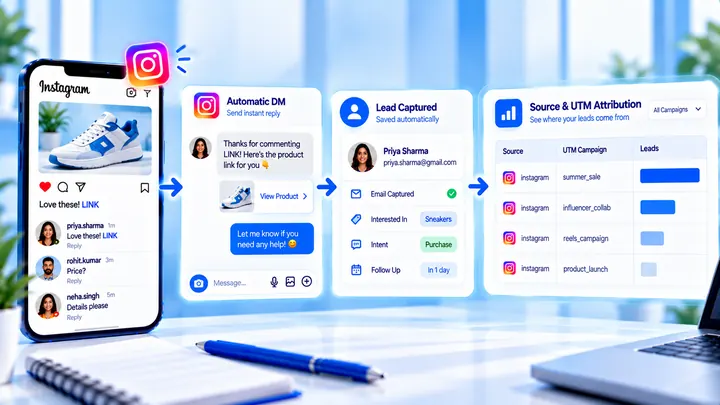
How to Measure Leads from Instagram Comments
A lead from a comment is a contact you can follow up — not a comment count. Wire keyword → DM → email or UTM before you celebrate.
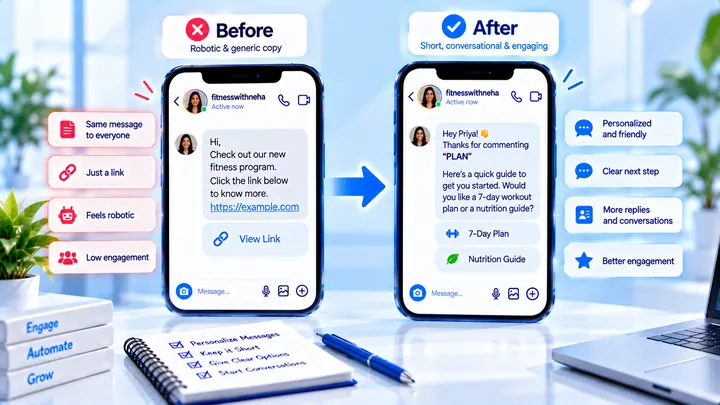
How to Write Automated Instagram DMs That Feel Human
Write human-sounding Instagram automated DMs: short openers, the promised next step, and a CTA that invites a reply — not a pitch wall.
How to Attribute Sales with Coupons in Instagram DMs
Unique codes in automated DMs can beat UTMs when checkout is messy — if you rotate codes and accept some leakage.