
WhatsApp and Instagram in One Shared Inbox
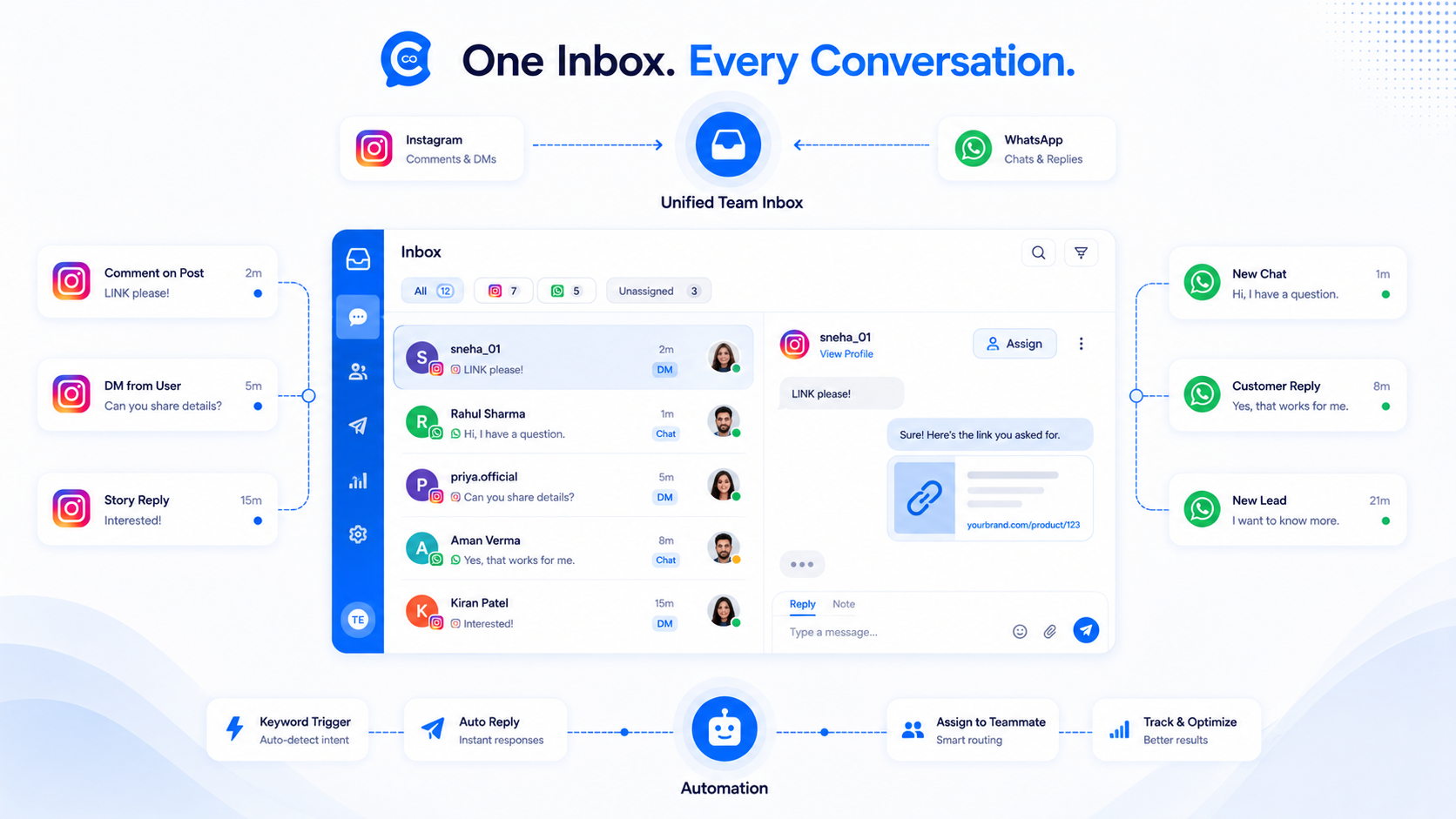
An Instagram WhatsApp shared inbox means the same people can answer Instagram DMs and WhatsApp chats without sharing passwords or keeping two browser profiles. It does not mean a comment on a Reel opens a WhatsApp thread. CommentLink will not build that hop. Meta’s products do not work that way, and vendors that advertise comment→WhatsApp are selling a different, often unofficial, story.
Instagram stays Instagram. WhatsApp stays a WhatsApp Business number you connect through Embedded Signup. The inbox is the meeting room. If a vendor promised that a Reel comment would open a WhatsApp chat by itself, that is not this product and not Meta’s comment-to-message path. Put a wa.me URL in the Instagram DM if you want an honest hop, then staff both threads in the same queue.
Why shops ask for both in one place
The commenter got a product link in IG DMs. The buyer prefers WhatsApp for payment screenshots. The intern was logged into Instagram on a phone. By Friday nobody knows who promised a size. A shared inbox with assignment, notes, and open/close is the boring fix. Channel-specific automations still run: comment-to-DM on Instagram, keywords and templates on WhatsApp.
What CommentLink connects
- Instagram Professional account via Meta OAuth. No password stored.
- WhatsApp Business via Meta Embedded Signup. The WABA stays yours. Meta bills conversation fees to you.
- Automations per channel. A Reel comment fires Instagram private replies, optional public replies, optional follow-gate — see comment-to-DM. A WhatsApp inbound can match a keyword or first-message rule. Welcome openers are Instagram inbox chrome (up to four tappable openers), not WhatsApp templates.
What the team sees
One queue. Filters by channel so you can work “only Instagram” during a Reel spike. Assignment so two people do not pitch the same buyer. Internal notes that the customer never sees. Open/close so a finished thread leaves the pile. Role-based access so the intern cannot dump a broadcast list. The Instagram-only version of this workflow is team inbox for Instagram DMs; this article is the two-channel version.
History stays on the contact. That does not merge an Instagram-scoped user and a WhatsApp number into one magical person unless your team tied them. Do not assume a commenter is the WhatsApp contact with a similar name.
Automations must stay on their channel
If you want the link in WhatsApp, the person has to be on WhatsApp — they message the number, they click a WhatsApp link you put in the IG DM, they scan a code. The IG DM can hold a wa.me URL. That is still an Instagram message containing a URL, not an API that turns a comment into a WhatsApp send. CommentLink will not pretend otherwise.
WhatsApp broadcasts use approved templates and Meta’s quality rules — broadcast practices that keep the number healthy. Instagram has no template-to-reopen equivalent in the same sense; after the care window, you generally need the person to write again. See the 24-hour messaging window.
Setup without sharing logins
- Convert Instagram to Professional and link a Facebook Page.
- Connect Instagram in CommentLink with Meta login.
- Connect WhatsApp with Embedded Signup. You need a number you control.
- Invite teammates with roles. Nobody gets the Instagram password.
- Build the comment automation on IG. Build WA keywords/templates separately.
- Decide who owns IG spikes versus WA payments in departments if you use them.
What this is not
- Not Wati-for-WhatsApp-only, and not ManyChat’s full omnichannel canvas.
- Not a claim that Meta partnership exists.
- Not a way to cold-message WhatsApp numbers harvested from comments.
- Not unlimited WhatsApp throughput. Cloud API tiers and fees apply.
A realistic two-channel path for a shop
Instagram Reel: comment SHOP, get the product URL in an Instagram DM, optional public “check DMs.” Some buyers will pay in the shop. Some will write “can I do this on WhatsApp?” You can include a wa.me link in the IG DM. When they write the WhatsApp number, that chat is a WhatsApp conversation in the same inbox — a new channel, not a converted comment. A human assigned to that thread sees notes from the IG side only if your team copied them or tied the contacts. Do not assume the system merged them.
Payments, shipping photos, and voice notes often prefer WhatsApp. Comments, Reels, and discovery stay on Instagram. The shared inbox is how the same staff member handles both without two product logins. Welcome openers (up to four tappable buttons when someone opens Instagram inbox) do not appear on WhatsApp; WhatsApp uses keywords, first-message rules, and templates instead.
Departments, roles, and who sees which channel
Role-based access can keep a contractor in Instagram only, or a billing person in WhatsApp only, depending on how you set departments. Least privilege is the point. Sharing the Instagram password to “just look at DMs” is how you skip the whole product. The Instagram-only habit of assign / notes / close still applies; WhatsApp adds template constraints when the 24-hour session is closed.
Fees and limits that stay separate
Instagram automated DMs: hourly cap, CommentLink safety queue about 200/hour/account, no Meta per-message fee. WhatsApp: Cloud API conversation charges billed by Meta to your WABA, quality rating, template approval, conservative pacing in the safety queue that is not a published Meta tier. Mixing those numbers in a standup is how someone “optimises” the wrong channel. Broadcast hygiene: WhatsApp broadcast best practices.
When you should not connect WhatsApp yet
If nobody will answer WhatsApp, do not connect it. An empty channel still accrues accidental templates and quality risk. If the only goal is comment-to-DM, Instagram alone is the product. Add WhatsApp when a number you control is ready and the team can staff it. Multi-brand: multiple Instagram accounts automation.
Putting a WhatsApp URL in an Instagram DM
This is the honest hop. The commenter gets an Instagram private reply that contains a wa.me link or a QR they can screenshot. If they tap and write, WhatsApp Cloud API starts a new conversation. The shared inbox then shows an Instagram thread and a WhatsApp thread. Your notes policy should say whether the agent copies context across. The API will not.
Do not harvest phone numbers from Instagram bios and blast them. That is not a shared inbox feature. Do not tell a vendor that “comment to WhatsApp” is a Graph product you are owed. Spur-style claims in this SERP are a different, often unofficial, category. CommentLink will not ship it.
Staffing: during a Reel spike, filter the inbox to Instagram. During a payment window, filter to WhatsApp. Assignment still prevents two discounts. Close still clears the pile. Broadcasts still need templates and quality discipline — they are not a way to ping every IG commenter.
If the shop has no WhatsApp number they control, stop at Instagram. Connecting a borrowed SIM is how numbers get recovered out from under you. Embedded Signup exists so the WABA stays yours.
FAQ
If someone comments, can I WhatsApp them automatically?
No. You can DM them on Instagram. You can put a WhatsApp URL in that DM. You cannot convert the comment into a WhatsApp API send.
Do I need WhatsApp to use comment-to-DM?
No. Instagram alone is enough for comment-to-DM. WhatsApp is optional, same inbox.
Who pays WhatsApp fees?
You do, via Meta, on your WABA. CommentLink does not hide or markup that bill.
Can agencies put client IG and client WA in one workspace?
You can connect multiple Professional accounts and numbers in one login. Still no shared passwords. See multi-account automation.
Is the inbox a live chat widget for the website?
No. Channels in product are Instagram and WhatsApp.
Can I merge an Instagram commenter with a WhatsApp number automatically?
Not because they have similar names. The team can treat them as one person only if you actually tied the records. Until then, two threads. That is safer than a false merge that refunds the wrong buyer.
Do welcome openers show on WhatsApp?
Welcome openers are Instagram inbox chrome — up to four tappable buttons when someone opens your IG inbox. WhatsApp uses keywords, first-message rules, and approved templates instead.
Who should own IG versus WA during a spike?
Assign. One person on the Instagram unassigned queue, another on WhatsApp payments, or one person with filters. The product will not guess. Departments exist so the intern does not send a broadcast. Comments still never become WhatsApp API sends; a wa.me in the IG DM is the only honest hop.
Can the same agent work both channels in one sitting?
Yes. Filter by channel when a Reel spikes or when payments land on WhatsApp. Assignment and notes stay the same. Connect WhatsApp only if someone will staff it. An empty number still carries template and quality risk.
Related reading
Run Instagram and WhatsApp in one workspace
Connect both channels with official Meta flows. Automate the repetitive DMs; assign the rest. Comments never jump to WhatsApp.
Automate Your Instagram DMsRelated articles
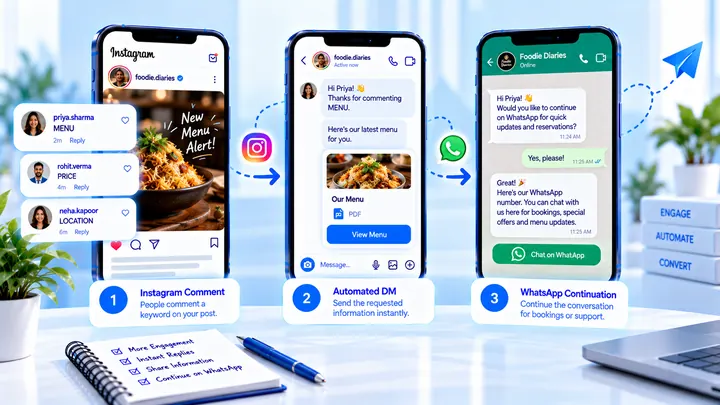
Instagram to WhatsApp Handoff After a Comment Lead
Comments stay on Instagram. A WhatsApp hop is a link or a number they choose — not a silent API jump.
Instagram Automation Metrics That Matter for Creators
Creators should track time saved, list growth, and clicks — not a fake DM open rate.
How to Attribute Sales with Coupons in Instagram DMs
Unique codes in automated DMs can beat UTMs when checkout is messy — if you rotate codes and accept some leakage.