
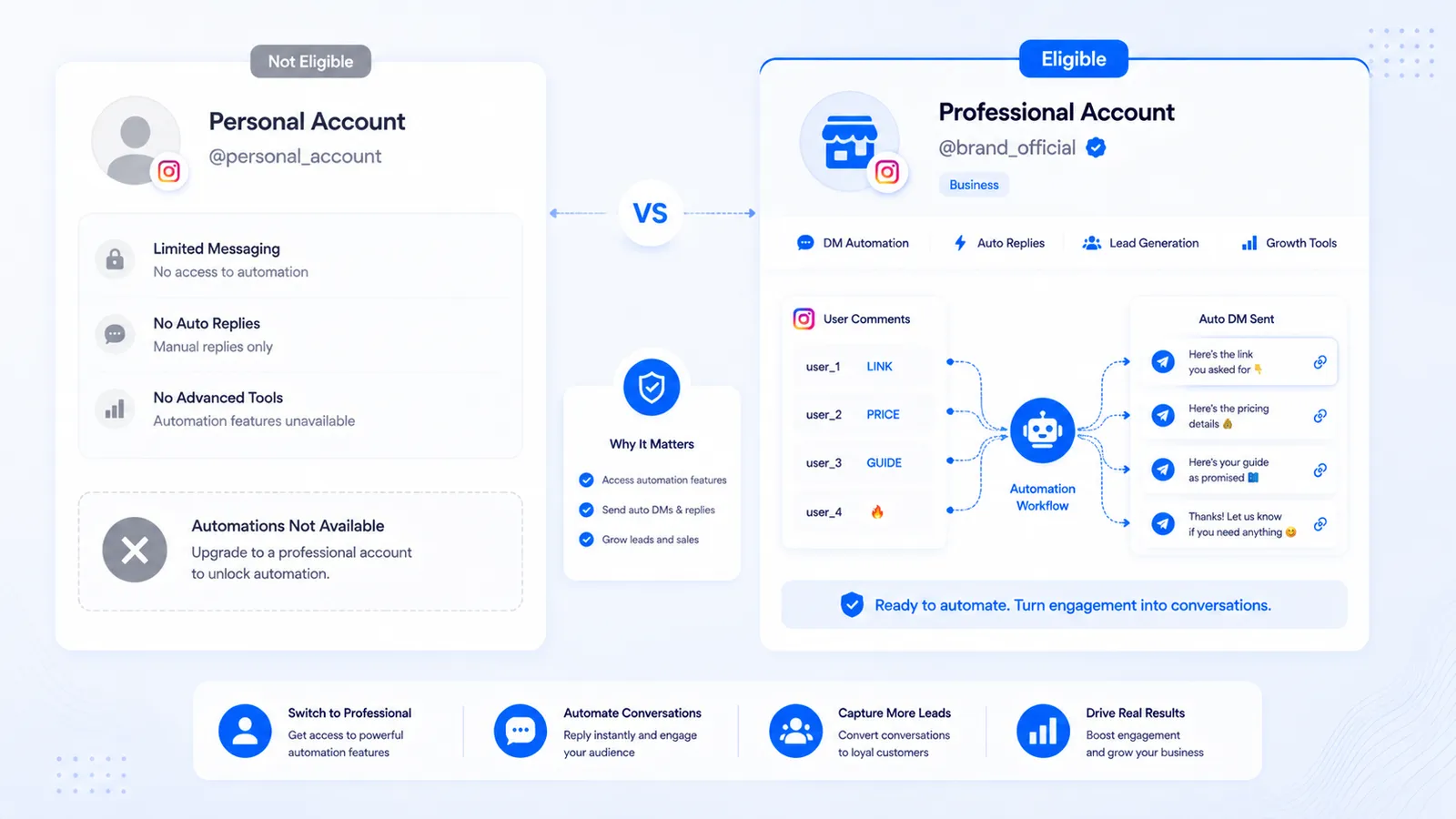
If you tried to connect a personal Instagram profile to an AutoDM tool and the login died on Meta’s screen, that is expected. Personal Instagram account automation through the official messaging APIs is not offered. CommentLink cannot secretly enable it. Native Business Suite Custom Keywords cannot either. The restriction is Meta’s.
This is a conversion and linking tutorial, not a lecture about “serious brands.” Plenty of one-person shops run Professional accounts. The label is a product type, not a personality test. If Meta login still refuses after you convert, the Page link is the next check — not a hidden personal-profile mode.
What “personal” means in Meta’s model
A personal profile is the default Instagram account: no professional dashboard, no ads manager pairing, no Page-backed messaging tokens for third-party apps. AutoDM that uses Graph messaging needs an Instagram Professional account — Business or Creator — that is linked to a Facebook Page. That Page is how Meta issues the tokens Business Suite and OAuth apps use.
Tools that ask for your Instagram password and then “automate a personal account” are not in this category. They are session bots. They are also how people get locked out. CommentLink’s connect flow is Meta OAuth. If OAuth refuses the account, we stop. We do not collect the password and try anyway. The allowed-or-not version of that argument is in Is Instagram comment automation allowed?.
Business versus Creator
Either Professional type can work for comment-to-DM if the Page link is correct. Business is the usual shop/service setup. Creator is the usual personal-brand setup. Switching is free and happens in the Instagram app. You are not buying a CommentLink plan by converting; there is no CommentLink plan.
Pick Creator if you want the creator-style professional tools and you are not running a classic storefront. Pick Business if you already think of the account as a shop, clinic, or local service. For AutoDM, the important part is Professional + Page, not which of the two badges you like.
How to convert and connect
- In the Instagram app, open Settings and convert the account to Professional (Creator or Business). The in-app copy changes; follow the current screens.
- Create or choose a Facebook Page you control. Link the Instagram Professional account to that Page in Meta’s accounts centre / Page settings (the exact menu name moves; Meta’s help articles are the map).
- Confirm you can open Instagram Professional tools and that the Page shows the Instagram account as connected.
- In CommentLink, connect Instagram with Meta login. Grant the messaging and comment permissions the screen lists. There is no password field.
- Create a comment-to-DM automation on a post or Reel you control. Comment from a second account to test. First-time DMs often land in Message Requests.
If the OAuth screen never lists the Instagram account, the Page link is the usual culprit — not a broken keyword. Walk the same checklist on CommentLink FAQs.
What you lose and what you do not
Converting does not delete your photos, followers, or username. It changes the account type. Some personal-only features go away; professional insights and messaging APIs become available. If you later switch back to personal, official AutoDM stops, because the API eligibility stops. That is another reason not to run a password bot “just until we convert.”
You still cannot AutoDM people who never commented. Professional is the door to the API, not a licence to spam. The setup once you are through the door is in how to automatically DM someone who comments on Instagram.
Agencies and “my client is still personal”
Do not connect by sharing the client’s Instagram password with staff. Convert their account (with their consent), link a Page they own, then connect via Meta login into the workspace. Multiple Professional accounts can live in one CommentLink login; that is a separate article on multi-account Instagram automation.
If the client refuses to convert, you do not have an AutoDM product for them on official APIs. Native Business Suite will refuse them too. Sell a human inbox process or wait. Pretending otherwise is how agencies inherit bans.
Troubleshooting the convert-and-connect path
- OAuth shows Facebook but not Instagram: Page link or Professional conversion did not finish.
- Connect succeeds, comments never fire: automation off, wrong media, keyword mismatch, or you commented from the same account (always test from a second profile).
- DM never appears: Message Requests, they do not follow you, or they filtered message requests. A short public reply that says “check your DMs / requests” is allowed when you configure it.
- Someone offers to “automate personal IG with a Chrome extension”: that is a different, unsafe category. Decline.
What conversion actually changes in the app
After you switch to Professional, Instagram shows professional tools: insights, the ads-related pairing, and the ability to connect a Facebook Page. Followers, posts, Reels, and the username stay. Direct messages you already had stay. What you gain is eligibility for Graph messaging and for Business Suite automations. What you lose is whatever personal-only switches Meta currently removes — the in-app convert screen lists those. This article will not inventory every personal feature Meta has ever deprecated; check the convert confirmation before you tap.
Insights are not AutoDM. A Creator account with pretty graphs still cannot send comment-to-DM until the Page link exists and an official app (Business Suite or CommentLink) holds a token. People convert, skip the Page, then blame the vendor. The OAuth screen that never lists Instagram is almost always that skip.
Page linking, the part everyone rushes
The Facebook Page does not need to be a famous brand page. It needs to be a Page you admin, connected to that Instagram Professional account. If you manage many Pages, pick the one that should own this IG — mixed-up Pages are how the wrong ad account and the wrong inbox appear later. After linking, open the Page’s Instagram settings and confirm the handle. Then connect CommentLink. If you connect first and link later, disconnect and reconnect so the token is issued against the linked pair.
- You admin the Page (not a partner who “will add you later”).
- The Instagram account shows as Professional in the Instagram app.
- The Page shows the same Instagram handle.
- Meta login lists that Instagram account. If it does not, stop and fix the link.
- Grant comment and messaging permissions the consent screen actually asks for. Skipping a permission is how automations connect but never send.
Personal profile plus a second Professional account
Some people want to keep a personal profile for friends and run AutoDM on a shop profile. That is allowed in the sense that they are two accounts. The shop must still be Professional and Page-linked. Do not run unofficial tools on the personal profile “because it is just comments.” Do not give staff the personal password. If an agency needs the shop, they connect the shop through Meta login into the workspace — see multi-account Instagram automation.
Switching a well-known personal profile to Professional is a one-way operational commitment for AutoDM. You can switch back to personal later; official messaging then stops. Plan the content mix (friends versus shop) before you convert a profile you cannot replace.
After connect: a first automation that proves the account type
Do not start with a viral Reel. Publish a quiet post, print a silly keyword in the caption, comment from a second account, and confirm a DM. That test proves Professional + Page + token + matching. Then build the real keyword on the real post. Setup after the door is open is how to automatically DM someone who comments. Policy context is whether comment automation is allowed — converting does not make spam legal.
If the test DM lands in Message Requests, that is Instagram, not a personal-account bug. Teach people to look there. A public reply is optional once you are Professional; personal accounts never reach that configuration screen on official APIs.
FAQ
Can CommentLink automate a personal profile if I only want comment replies?
No. Public comment replies and private DMs on the official APIs both need a Professional account. Native tools have the same gate.
Is Creator enough, or do I need Business?
Either Professional type works when it is linked to a Facebook Page. Choose the type that matches how you use the account.
Will converting hurt reach?
Meta does not publish a penalty for converting. What hurts reach is spammy comments and misleading DMs — on any account type.
Can I keep a personal profile and run AutoDM on a second Professional account?
Yes, if that second account is Professional, Page-linked, and connected through Meta login. Do not mix passwords across staff laptops.
Why did a browser bot promise personal-account AutoDM?
Because it logs in as you. That is not Graph messaging. It is also how accounts get challenged. Official AutoDM starts after you convert.
Related reading
Use comment-to-DM on a Professional account
Convert to Creator or Business, link a Facebook Page, connect with Meta login, and send the link in a private DM when someone comments.
Turn Comments Into DMsRelated articles
Instagram Automation Dashboard: What to Track Weekly
A weekly checklist: connection health, queue depth, failed sends, and one campaign metric — not 40 vanity charts.
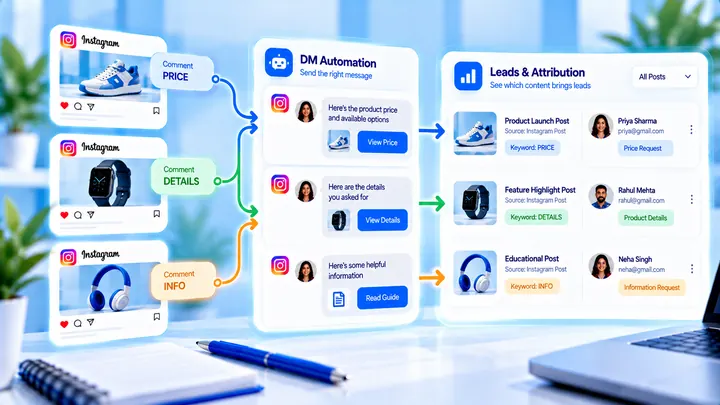
How to Track Instagram DM Leads by Post
Know which Reel created conversations — name campaigns, use UTMs, and do not mix every keyword into one bucket.
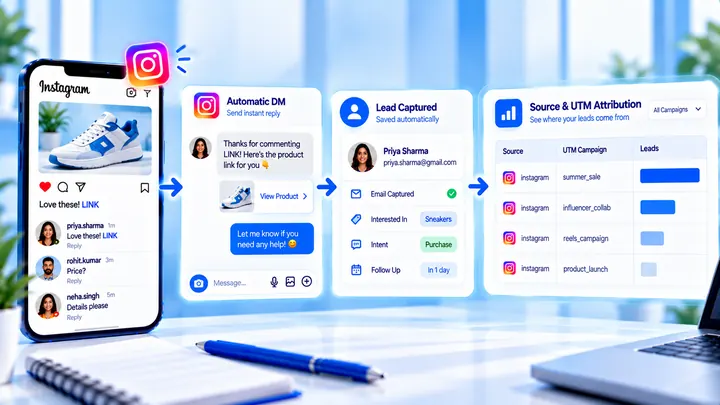
How to Measure Leads from Instagram Comments
A lead from a comment is a contact you can follow up — not a comment count. Wire keyword → DM → email or UTM before you celebrate.